


Let us dive into the exciting process of game creation!
In this lesson, you will begin writing the actual code that brings your game to life. The previous lessons prepared you by helping define the game’s key objects and their responsibilities. Now, with those ideas in place, it is time to create your first class in Smalltalk: ShooterGame.
This class will act as the canvas for everything else that follows. Though it may seem plain at first, much like an artist’s blank canvas, your ShooterGame Morph will soon host a lively collection of interactive game objects – ships, enemies, shots, and more. Unlike a painting, however, this canvas can respond, animate, and change as your code evolves.

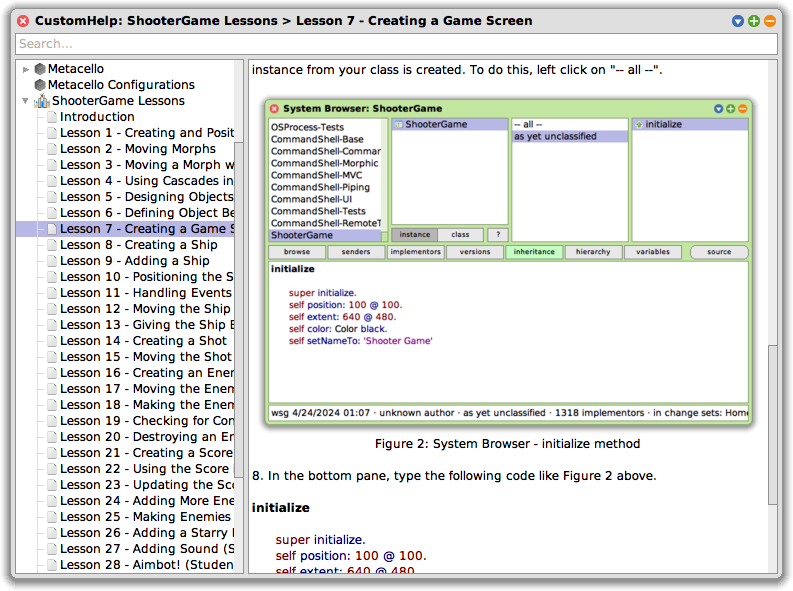
Using the System Browser
The work begins in the System Browser, a powerful tool within the Squeak environment where you can write, view, and organize your code. You can open the System Browser from the main menu under Tools → Browser, or by left-clicking on the desktop background and selecting Browser.
This browser is not the only place you can write code in Squeak, but it is the one you will use most frequently as you build and modify your game. You will use it to define classes, write methods, organize your code into categories, and explore existing functionality that your objects can build on.
ShooterGame as a Morph
When you create your ShooterGame class, you define it as a subclass of Morph. This design choice is essential. A Morph is a graphical object in Squeak that can be added to the screen, moved around, colored, resized, and interacted with. By making ShooterGame a Morph, you give it the ability to appear on the screen and act as a visible, interactive container for the other game elements.
This inheritance relationship also means that ShooterGame will share the capabilities of Morphs – like positioning and drawing – while allowing you to add new, game-specific behavior through your own methods.
Understanding Initialization
After defining your class, you will write its first method: initialize. This is a special method that sets up a new instance of the class when it is created. It is also an ideal place to define how the object should appear and behave initially.
An instance of a class is the actual object that gets created from that class. Think of the class as a blueprint or a set of instructions – like the design for a computer. That design tells you what the computer will have and how it will work. But until someone actually builds a computer from that design, you do not have a real one. The same is true in programming: the class is the design, and an instance is the real, usable object created from that design. Every time you create a new object from a class, you are making a new instance of it. And because everything in Smalltalk is an object, even the class itself is a kind of object – one that can do things, not just describe them!
Inside the method, you will encounter super initialize. This line is important. It tells the system to first run the initialize behavior of the parent class – in this case, Morph – before adding your custom setup code. An initialize method should always start by sending super initialize. Skipping this line can lead to unexpected issues because it would prevent an object from preparing itself properly.
Following that, you will define the Morph’s position and size using the position: and extent: messages. In Squeak, extent refers to the width and height of the Morph – think of it as how much space it occupies on the screen. The coordinate system in Squeak starts at the top-left corner of the screen (0 @ 0), and each point is written as an x and y pair (e.g., 640 @ 480). These lines of code determine where your game window will appear and how large it will be.
You also set the background color to black and give the object a name using setNameTo:. These finishing touches help establish your game’s visual style and identity.
Positioning and Sizing
In Squeak, the World refers to the entire display area of the environment – the space where all graphical objects (Morphs) appear and interact. It is the backdrop of your development tools, your game, and the broader environment in which your game objects will live and move. Even the tools you use to write your code – such as the System Browser – are Morphs themselves, sharing the same space and able to interact with the same environment as your game.
Squeak uses a coordinate system to place and size Morphs on the screen. The top-left corner of the World is the origin (0 @ 0). When you set a Morph’s position to 100 @ 100, it will appear 100 points from the left and 100 points from the top. The extent describes the Morph’s width and height – how much space it will take up on the screen. These values give you precise control over where and how your game interface is laid out.
Seeing the Results
Even after completing just this lesson, you will be able to see the first visible result of your code. Though the game is not yet playable, the space in which it will take shape is now visible and ready for action. The foundation is laid, and every lesson from here will build upon it.
Remember that these lessons are designed for live coding – you are encouraged to run, modify, and explore your work as you go. That is one of the great strengths of Smalltalk. The lessons in this series are designed for live coding, meaning the game does not need to be closed and restarted when changes are made. You can follow through the lessons just as easily without live coding; however, you may not learn as many topics, as some only arise from using live coding. Also, remember that, unlike some other programming languages, Smalltalk does not require a final period (.) at the end of a method. The final period in the last expression is optional.
And finally, remember to save your work once you have successfully completed the lesson. This ensures you can pick up right where you left off next time or provides a good recovery option if something should go wrong.
Lesson Resources
To access Lesson 7 and the full series of tutorials for building the Shooter Game, visit https://scottgibson.site/ShooterGame/. There you will find everything you need to follow along, including PDFs, Squeak Help lesson content, source code, images, sound files, and other game assets. This site not only provides everything you need to progress but also even allows you to play the game directly in your browser using SqueakJS. Whether you are just getting started with Squeak/Smalltalk or advancing your skills, these resources will help guide you as you move forward through the game development process.

Have a great time with Smalltalk and keep on Squeaking!



 The Weekly Squeak