
Category: Development

  • Recovering from Frozen Images in Squeak

    Recovering from Frozen Images in Squeak

    When developing complex systems, encountering errors that leave your project in a frozen state can bring much sadness and consternation. For developers working with Squeak/Smalltalk, a frozen image refers to a situation where the system becomes unresponsive. This can happen due to various issues, including deadlocks, infinite loops, or recursive operations in Smalltalk code, which can cause the VM to freeze, hang, or lock up.

    A recent discussion in the Squeak community highlighted how one such incident, caused by a stuck semaphore during an image load, turned into an opportunity for both recovery and valuable practices in safeguarding against future mishaps. You can explore the full conversation in the Squeak-dev mailing list thread (here).

    The Problem: Semaphore Deadlock in the Image File

    In this case, a developer encountered an issue while attempting to draw in multiple background threads, using a chain of semaphores to manage the UI thread. After resolving an error in one of the background threads, the drawing process was resumed. However, it was found that the image would fail to load. Instead of opening, the image became unresponsive and effectively “frozen.” It had likely become stuck due to a semaphore waiting for a signal that would never come. This left the image unresponsive and effectively unusable – or so it would have seemed.

    Recovery Options: DoItFirst and Debugging

    The good news is that there are several options available for recovering from such failures.

    For developers dealing with frozen images at startup, Squeak provides a mechanism called DoItFirst. This is a class that is processed at the very beginning of the image startup sequence, allowing developers to inject custom code or actions before the main system fully loads. By using command-line arguments like --debug, it is possible to force the image to enter the debugger at the earliest point in the startup process, allowing issues to be diagnosed and fixed before the image fully loads.

    Additionally, for situations where the issue is well-understood, the --doit option allows Smalltalk expressions to be passed and executed before any problematic behavior occurs, giving developers a chance to resolve issues before they impact the image during loading.

    Another option is to open the Virtual Machine (VM) in a debugger. In the specific case of a stuck semaphore, you can set a breakpoint in interpret. Run the VM until it reaches interpret a second time (the first invocation does some initialization). At this point, you can use printAllProcesses to locate the stuck process. This should display the semaphore the process is waiting on. Once identified, you can invoke synchronousSignal with that semaphore to unstick it and restore functionality without losing significant progress. While this technique can specifically handle a stuck semaphore, it could also be helpful for other cases of system hangs or unresponsiveness.

    The Importance of Backups and Versioning

    While debugging and recovery tools are invaluable, it is clear that prevention is equally important. Routine backups and effective versioning are essential practices that can mitigate the risks associated with frozen images and other failures. One practice that proved helpful in this case was maintaining regular system backups, which made it possible to quickly restore a previous version of the image with minimal data loss. However, more granular versioning, especially in environments with frequent risky changes, would provide an additional layer of safety.

    Specifically, incremental versioning of the image can be a lifesaver when things go wrong. By saving a new version of the image each time a meaningful step in development is reached, developers can create a clear history of their work. This allows them to revert to earlier versions of the image if issues arise, minimizing the impact of failed changes and speeding up the recovery process. Incremental image saves help ensure that even if an image becomes frozen or corrupted, a previous, stable version can be restored with minimal effort.

    The Robustness of Squeak: Multiple Recovery Options

    One of the key takeaways from this experience is how robust Squeak is in terms of recovery options. Even when a frozen image occurs or the system becomes unresponsive, Squeak offers multiple layers of recovery mechanisms. Whether using DoItFirst to inject custom code during startup or interacting with the VM through a debugger to manually resolve issues with semaphores, there are a variety of ways to recover from errors and get back on track.

    Additionally, Squeak’s development environment is designed to be highly flexible, encouraging experimentation while ensuring that recovery is always possible. One of the key advantages of Squeak is that all the code executed or saved during development is stored in the .changes file. This makes it possible to recover from almost any issue, as the system is built to retain all your code. Even if an image becomes frozen or corrupted, the code itself is never truly lost. With the resources mentioned in this article, developers can restore their environment and continue their work. In Squeak, code is safe; no matter what happens to the image, your code can always be recovered.

    Conclusion

    In conclusion, while Squeak’s development environment offers tools to recover from serious errors, the most effective defense is good preventive practice: maintain regular backups, version your work consistently, and always be mindful of the unexpected.

    For more detailed information on using DoItFirst to debug and recover your Squeak image, visit the DoItFirst Swiki page (here). If you encounter issues like crashes or freezes in Squeak, there are various levels of potential failure to consider, and helpful guidance is available in the What to do if Squeak crashes or freezes resource (here), which offers insight into diagnosing and resolving different types of system freezes or crashes.

    Have a great time with Smalltalk and keep on Squeaking!
  • Ray Casting With Squeak

    Ray Casting With Squeak

    Ray Casting With Squeak

    On the Squeak developers mailing list, Lauren Pullen shared her experience (found here) using Squeak while working on a rendering engine for a first-person maze game, similar to the technique used to render the original Wolfenstein 3D game. Wolfenstein 3D used a rendering technique known as ray casting. Her project captured our attention prompting us to seek additional information from her about it.

    What is Ray Casting?

    Ray casting is an early rendering technique used in computer graphics and video games, particularly in 2.5D and 3D environments. It is a simplified form of ray tracing, where a ray is cast from the player’s or camera’s perspective into the environment, and the distance to the nearest object along that ray is calculated. This process is repeated for each column on the screen, creating a 3D representation of the 2D world. Ray casting was widely used in the early days of 3D gaming, particularly in games like Wolfenstein 3D (1992).

    From Lisp to Squeak

    Lauren, with her extensive experience in Common Lisp, initially chose it to create a GUI application. However, she faced significant challenges. The graphics library was unreliable, often failing to start, and the outdated documentation made it difficult to work with. She studied MVC while designing her application but struggled with basic functionality, such as displaying a simple window.

    She decided to switch to Smalltalk, specifically Squeak, which had an immediate impact. The graphical elements worked seamlessly from the start, and although she missed some features from Common Lisp, like restarts and method combinations, Squeak provided a development environment that allowed her to focus on development without drastically changing her mental approach to problems.

    Comparing Development Tools

    For game development, she initially relied on a much earlier version of Game Maker Pro. When she explored Godot, she found its complexity overwhelming compared to Smalltalk. The disorganization in Godot’s tutorials made her question how to create a basic viable product efficiently. In contrast, though seemingly minimal, Squeak’s classes Form and UserInputEvent provided all that was needed.

    Advantages of Squeak

    In Squeak, she found it easy to work with graphical elements. Drawing interface components and importing graphics were straightforward, thanks to the source code access for built-in drawing functions. This simplicity was crucial for her development process. While working on the game, she realized that making changes and seeing immediate results was invaluable for debugging. Her experience with Forth taught her the value of functions that do one thing well, and Smalltalk’s debugging tools like Inspect-It and Debug-It further streamlined the process.

    Challenges and Solutions

    However, she encountered challenges. While most errors in Smalltalk were easy to handle—usually, closing the Debugger was all that was needed—some issues could freeze the image, making recovery a bit more manual than desired. She found herself needing to use the Recover Changes window to restore unsaved changes more often than she would have liked.

    In terms of rendering, she faced performance limits with BitBlt when texturing the floor and ceiling. To overcome this, she turned to the AbstractGPU library, leveraging the graphics card for drawing. She continued to use the ray caster to determine what the player could see to speed up the game, but introduced edge pop-in, where objects on the screen edges would suddenly appear while turning the camera, because of differences between the ray caster’s projection and the GPU’s projection. Increasing the field of view used by the ray caster resolved this issue.

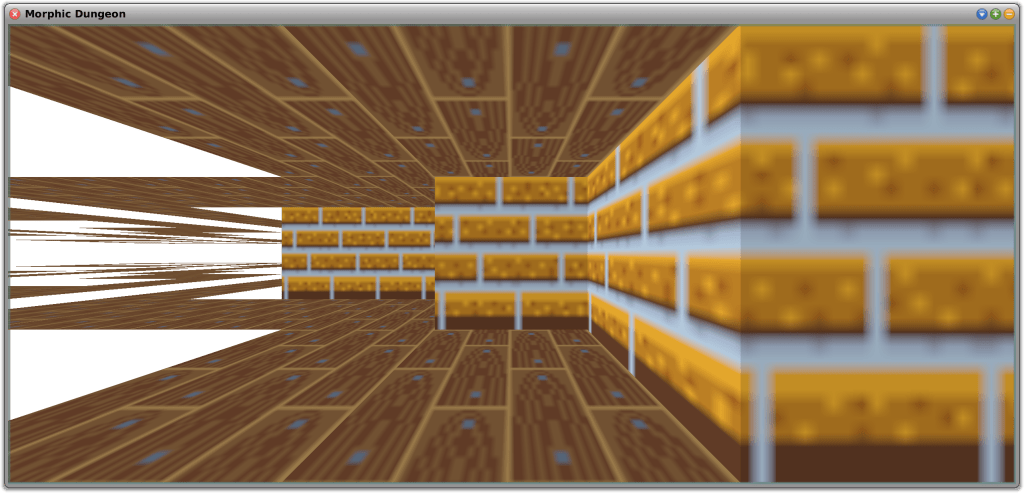
    Testing Using Morphic Dungeon

    Morphic Dungeon is what Lauren developed and uses to test the movement and texturing code. She wants to work with textures that are not symmetrical, which requires mapping the top-left corner of the texture to different positions on each face of the 3D objects. This approach also allowed her to test back-face culling—a technique that improves performance by not drawing faces of a 3D object that are not visible to the camera—in the GPU mode. In this mode, the “back faces” are flipped horizontally and appear further away, as if looking at the inside of a transparent painted box instead of the outside. Back-face culling will be essential for rendering the “walls” of tiles that the player can enter or see through, such as grass or support beams along the grid edges.

    Lauren implemented three movement modes:

    • Free Movement and Free Turning
    • Grid-Locked Movement and Free Turning
    • Grid-Locked Movement and Grid-Locked Turning

    Full Free Movement is similar to Wolfenstein 3D, allowing sub-pixel steps and small increment camera rotations.

    Grid-Locked Movement is useful for first-person dungeon crawlers. Grid-Locked Turning forces camera rotation to 90-degree increments, similar to classic non-raycaster games like Wizardry or modern titles like Etrian Odyssey. Free camera rotation, with Grid-Locked Movement, is also supported which is similar to the modern title Operencia.

    While using Morphic Dungeon to test the different movement modes, Lauren encountered an amusing floating point error whereby the player would step repeatedly through walls and out of the play area. This provided a humorous insight into the potential bugs she might encounter.

    Additionally, Lauren tested the game with a family member, revealing that the 40×40 maze, though not difficult from an overhead view, proved challenging from a first-person perspective without an overhead view or compass. This feedback helped her adjust the difficulty of the first area to better suit new players.

    Future Plans

    Looking ahead, she plans to explore non-flat levels and dynamically stitching multiple maps together. This might result in overlaps while rendering, so the ray caster will be in charge of telling the graphics card what to draw. Meanwhile, she will focus on improving floor and ceiling loading performance, although this is currently less critical due to the few vertices involved.

    Lauren believes that developing a game is a great way to introduce people to programming. While tools are useful, having something that you can play with is fun. Old tile-based games and raycasters are particularly appealing to her because they are simple to work with, even for beginners.

    Overall, Lauren believes that Squeak has proven to be an excellent choice for her project, offering the simplicity and functionality needed for a successful game development experience.

    Why Not Give It a Try?

    If you would like to experiment with ray casting in Squeak, you can find out more about her project from SqueakSource here. To use the 3D accelerated package, you will also need AbstractGPU by Ronie Salgado, available (here). Ronie is the author of a number of terrific 3D development tools, including Woden (here) and Sysmel (here). Be sure to explore these excellent resources as well!

    Have a great time with Smalltalk and keep on Squeaking!

  • Code Contributions to Squeak

    Code Contributions to Squeak

    Squeak is a highly open system, which makes it very easy not only to explore every interesting detail in the image but also to customize everything at your will. Whether you would like to adjust some colors, fix a bug you have stumbled upon, or add a new feature, (almost) everything is flexible and under your control.

    Squeak lives from your contributions! Squeak is powered by volunteer open-source contributions. Whenever you make an adjustment to the base system, you might ask yourself: “could others benefit from this change, too?” If the answer is yes, we invite you to consider contributing back to the community. Or if you just discovered a bug, have a question, or would like to discuss an idea, our forums are open!

    The Squeak Community Model

    The majority of communication about the Squeak development takes place on the squeak-dev mailing list. There is a public mailing list archive, but to engage in any discussion, you have to sign up for the list. Alternatively, you can report issues on our GitHub issue tracker.

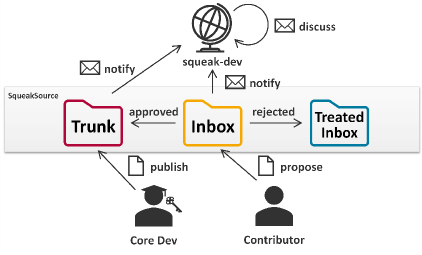
    On the mailing list, ideas, bug reports, and patches are exchanged. Version control for all Squeak packages is run via Monticello. All versions that are uploaded to any Squeak package will automatically be forwarded to the list for further discussion. There are three package repositories (hosted on https://source.squeak.org/):

    • The Trunk repository contains the latest integrated patches. (Only core developers have write access.)
    • The Inbox repository is the place for all new suggestions and requests for review. Everyone can upload proposals here without the need to create an account. (You can still create an account on https://source.squeak.org/ and edit the repository info of the inbox repository in the Monticello Browser to add your credentials.)
    • The Treated Inbox repository is for versions that have been dealt with or that have been superseded; it provides some useful history.

    The usual workflow for a new contribution is to upload it to the inbox, where others will discuss and review it on squeak-dev, and from where it usually will be merged into the Trunk eventually. Here you can learn more about our development process: https://squeak.org/development_process/.

    Making Your First Contribution

    • Install the latest Trunk updates.
    • Make your change, preferably starting from a clean image (to avoid configuration drift).
    • Open the Monticello Browser:
      • On the left, select the package you have changed (changed packages are marked with an *asterisk).
      • On the right, select the inbox repository.
      • On the top, press save.
      • On the left, select the package you have changed (changed packages are marked with an *asterisk).
      • On the right, select the inbox repository.
      • On the top, press save.
    • Review your changes, enter a meaningful version message that explains what the changes are for (e.g., which bug they address, what they are aimed at improving), and accept the new version to upload it.
    • That’s it! Your contribution has arrived in the Inbox and soon you will receive feedback from the community through the mailing list. Keep an eye on your mailbox!

    Squeak Inbox Talk

    Squeak Inbox Talk is an optional tool that attempts to simplify the development process by bringing together all the different artifacts that belong to the development process – mailing list, archives, and Monticello versions – and allowing you to interact with them directly from your image. You can access it from the Tools menu or install it by evaluating Installer installSqueakInboxTalk in a Workspace window.

    More information on Squeak Inbox Talk can be found on GitHub: https://github.com/hpi-swa-lab/squeak-inbox-talk.

    Advanced Concepts

    Change sets: Usually, new proposals are best submitted to the inbox as a new package version. However, when some ideas consist of changes to multiple packages, it becomes tricky to work with multiple versions from the inbox. In this case, a change set is a good alternative. Change sets are collections of methods and class definitions, plus some extras. You can open a dual change sorter from the Tools and Changes menus in the docking bar and open a menu on the change set list on the left. Create a new change set and copy or move all relevant changes to it. Add a preamble to the change set to add an explaining message and finally file out or mail to list it directly. To install a change set, you can file in it from the file list, or you can drag and drop it into Squeak from the outside.

    Preambles and postscripts: Some changes make it necessary to run some scripts before or after loading the new code to perform any migrations or changes to the global object graph. This is possible through preambles and postscripts. To add or edit a script for a Monticello package, select it in the Monticello browser and press the Scripts button. Add your logic to the code, test it, save it, and include it in your next inbox version. Note that preambles and postscripts in Trunk packages are required to be idempotent and may be evaluated multiple times. For change sets, you can add a preamble and a postscript as well from the context menu of the change set list in the change sorter.


    If you identify any other contribution-related concepts that should be mentioned or explained in greater detail, please feel free to add them to the Contributing to Squeak help documentation. It could even be your first contribution!

    Thanks to Christoph Thiede for contributing this excellent documentation! You can find it within the Squeak Help menu (Help->Contributing to Squeak) in the latest alpha version of Squeak. This documentation is especially valuable in this context, as it includes helpful links that execute useful code and actions, further simplifying the process.

    Have a great time with Smalltalk and keep Squeaking!

  • Squeak 4.5 Released!

    squeak4.5

    From Chris Muller:

    So!  Let it be known!  Squeak 4.5 is released!

    Home page is here:  http://www.squeak.org

    4.5 release notes are here:  http://wiki.squeak.org/squeak/6193

    Excellent Job Everyone!!  Can you tell we are excited!

  • Google Summer of Code – Student Smalltalkers wanted!

    Janko Mivšek wrote to the squeak-dev mailing list that “we are preparing an application to this year’s Smalltalk Google Summer of Code under the ESUG umbrella, as last year”.

    Google Summer of Code is a global program sponsored by Google that offers student developers stipends to write code for various open source software projects. The Smalltalk community has a successful record of participation in the scheme, under the aegis of ESUG in recent years, and our organisers are looking for students and ideas, (and even better, students with ideas) for our entry in this year’s programme.

    Janko asks Smalltalkers to “please start thinking about ideas what projects would be nice to have. Also start looking around for students. How to approach the universitites near by you, do you know who to contact there, etc”.

    To see last year’s ideas and projects, visit the site for last year’s students. You can find out more at the new Smalltalk GSoC 2011 website: http://gsoc2011.esug.org, and don’t forget to ensure you’re aware of the GSOC timeline.

  • New tools for Squeak

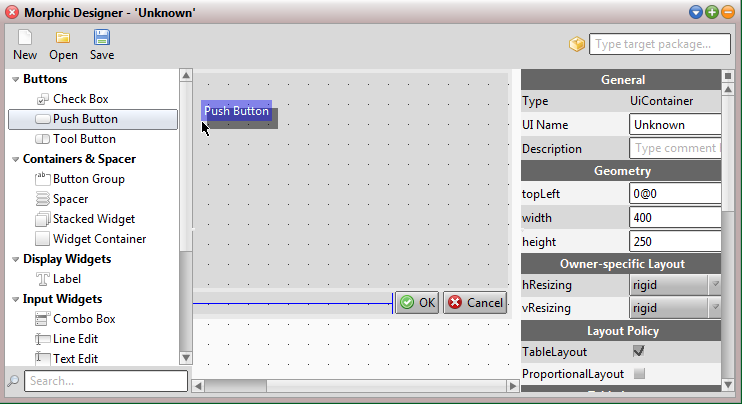
    The staff and students at the Hasso Plattner Insitute have set up a new site to share the impressive work they are doing using Squeak. The projects they are showcasing include some gorgeous UI Widgets and a new UI Designer (shown above).

    Each project is available at the Institute’s SqueakSource server, and can be loaded using Metacello configurations.  All configurations were tested and run in the current Squeak (Trunk) versions (4.1, 4.2). The site is built using Trac project management software, which provides for issue/bug tracking if you do find any problems.

    Many thanks to the Software Architecture Group, led by Prof. Dr. Robert Hirschfeld at the Hasso Plattner Insitute (University of Potsdam), for sharing these great projects.

    (Note that Firefox currently gives a warning about the site due to an incomplete certificate chain, but this should be fixed soon).

  • Google Summer of Code – work begins!

    Good news from Mariano Martinez Peck, one of the key organisers of the joint Smalltalk entry into this year’s Google Summer of Code: the students started work on their projects this week!

    Following Google’s decision to focus on fewer organisations last year, ESUG co-ordinated a joint application for projects across all Smalltalk dialects this year, and were so successful in this venture that they got approval for 6 projects. You can find out more about the selected projects at the projects page.

    For the last two weeks or so, students have been talking and discussing with their mentors, reading and investigating about the projects, and perhaps getting an early start on their development work. This was in line with the GSoC deadlines that you can read at the ESUG GSoC site and at the GSoC blog.

    The organisers have told students to ask in case of problems or questions to their mentors but also to the community through the mailing list, so be prepared to help out with questions and issues that the students may have.

    Mariano says “Good luck to all students and enjoy this wonderful opportunity you have. Now we are in the best part of the program!”

  • Final preparation for 4.1 now under way

    Following the successful release of Squeak 4.0, which was the first version of Squeak to be cleaned of all non-open-source code, there was enthusiasm to quickly get the next release out of the door. This was driven by concerns that the long and difficult process of re-licensing and re-writing meant that many areas of the 4.0 release were a long way behind the current state of Squeak.

    As a result, there has been a concerted effort to move quickly to release version 4.1, incorporating many bugfixes, thorough test suites, much faster and cleaner code in many areas, the removal of obsolete code, and a much more consistent and clean user interface. It will also offer a much simpler and more robust installation process for new users.

    The work on preparing for the 4.1 release is now drawing to a close, but more help is still welcome! You can support the work by downloading the latest release candidate from http://ftp.squeak.org/trunk/ (and possibly the 4.0 sources file) and:

    • ensuring all tests are green,
    • contributing fixes for issues marked as critical for 4.1 on bugs.squeak.org (or any other fixes you’ve been hiding up your sleeves),
    • checking that your packages on SqueakSource and SqueakMap install correctly in the new version,
    • checking that the new Windows installation process works on your configuration,
    • and of course, keeping an eye on the squeak-dev mailing list to ensure that you’re not duplicating work.

    We expect a lot of interest in this new release, and want to ensure that we give new users a great first impression of Squeak. If you want to contribute to this work, now’s the time!

  • Call for students for Google Summer of Code

    Janko and Mariano who are co-ordinating the joint ESUG application to this year’s Google Summer of Code are now looking for students to apply for the thirty-five proposed projects. The process couldn’t be simpler: review the list of projects, and you can register your interest in projects with just one click once you’re registered. You can also contact the project mentors for more information.

    Note that this approach allows many students to register for each project, so if you want to improve your chances, make sure the project mentors can see why you would be the best choice for their project by editing your biography, and making sure that your contact information is up to date!

    You must register by 9th April, so get cracking!

    Any questions, visit the ESUG GSoC website, or contact the admins at esug.gsoc.adm2010@gmail.com.

  • Google Summer of Code – candidates needed at once!

    The Squeak community are working with ESUG to submit a joint entry to this year’s Google Summer of Code but need your help at once!

    Squeak participated in GSoC  in 2007 and 2008 but in 2009 Google started to focus on bigger communities, so Squeak developers are working with ESUG this year to put together a joint submission with other groups including open-source projects from all Smalltalk dialects, including Pharo, Smalltalk/X, GNU Smalltalk and Cuis as well as commercial distributions such as VisualWorks, VisualAge, Dolphin and Gemstone. Entries from cross-platform projects like Seaside, AidaWeb, Magma, etc. will also be welcome.

    Mariano Martinez Peck will administrate the joint application supported by Janko Mivšek. They need to supply Google with information about ESUG as a mentoring organisation and a list of ideas/projects,  each with a description and a nominated mentor. If their submission get selected by Google they will be told how many projects Google will sponsor — the mentor receives $500 and the student who volunteers to work on the projects will receive $4500.

    Due to a late start, they are very near to the first deadline! They have until 12th March 2010 to submit all the information of the mentor organisation and give the list of projects with mentors. So as a matter of urgency they need your projects. They’ve put together a webpage to hold details, so if you have project suggestions, send them a short title and a paragraph (for the moment) explaining the idea. You can also reply to Mariano’s email on most of the key developer mailing lists including the squeak-dev mailing list.

    Good mentors are often as hard to come by as good ideas, but often being helpful, being aware of the dates, answering emails, etc. can be more important than the Smalltalk knowledge, so if you’re able to act as a mentor or a back-up, let them know at once!

    For some inspiration, you can see the ideas proposed in previous years:
    2007: http://wiki.squeak.org/squeak/5936
    2008: http://wiki.squeak.org/squeak/6031
    2009: http://wiki.squeak.org/squeak/6120