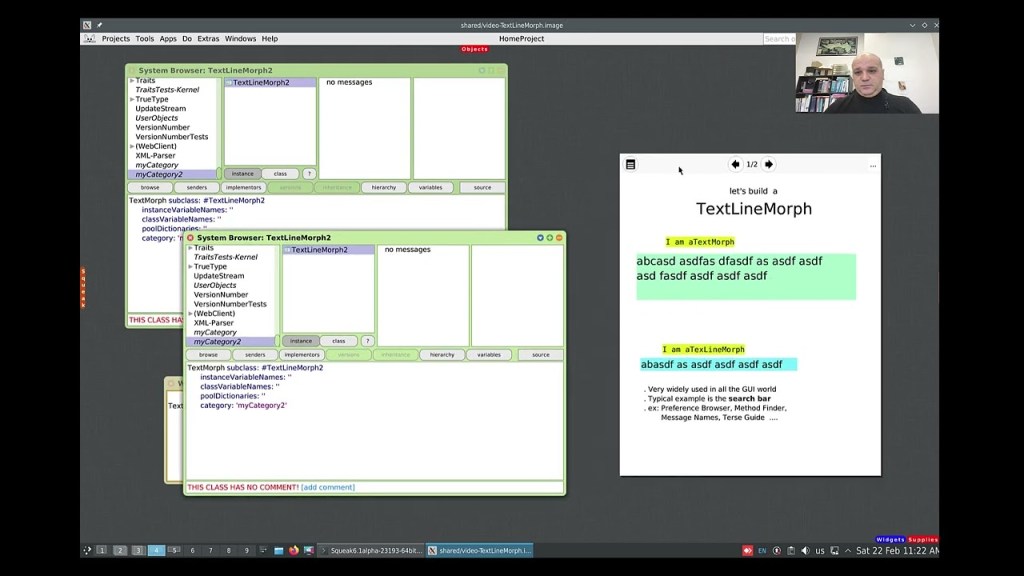
While working with Morphs can be quite easy at times, working with both text and Morphs might not always seem as straightforward. Dr. Nicola Mingotti provides a helpful video that demonstrates a commonly needed functionality in graphical interfaces, where you would typically want to accept a single line of textual data. Check out his video to see how this can be easily accomplished. You can view the video demonstration “Make a TextLineMorph in Squeak Smalltalk”here.
Have a great time with Smalltalk and keep on Squeaking!
This lesson will be the last introductory lesson (lesson practices) before we begin the actual game creation.
This lesson is simple and quick, but it introduces cascades, which are commonly used in Smalltalk code. Understanding and becoming familiar with them will help you utilize them effectively, as well as recognize them when you encounter other Smalltalk code. By using cascades, you can reduce code clutter and minimize the amount of typing needed.
The following code is an example from Lesson 3. This code completes messages by using a period which in Smalltalk is the statement separator. Placing a period between two expressions turns them into independent statements.
Even though the code looks simpler, it is important to understand what is happening. When the same object is the receiver of a sequence of consecutive messages, you do not need to repeat it. You can remove the repeated receiving object and replace the ending period with a semicolon (;). So, the basic rules for cascades are:
Cascaded expressions are separated by semicolons
All cascaded messages share the same receiver as the last message executed before the first semicolon
So, if it is as simple as replacing periods with semicolons, why does this lesson’s example not work if a semicolon were placed after “SimpleButtonMorph new”?
SimpleButtonMorph is a class, not an instance of that class. This means that you cannot send instance messages directly to the class itself. A class can receive class messages, but in this example, we are sending instance messages, which can only be sent to instances of the class, not the class itself. Therefore, to interact with the instance, you must first create an instance by sending the message “new” to SimpleButtonMorph. It is this instance of SimpleButtonMorph that can receive instance messages. In other words, all the cascaded messages are sent to the object created by “SimpleButtonMorph new”, demonstrating how a sequence of cascaded messages can be sent to the result of an expression.
In conclusion, understanding and using cascades in Smalltalk can greatly simplify your code, making it more readable and reducing redundancy. By chaining multiple messages to the same object in a single expression, you can streamline your code and focus on the logic rather than repetitive syntax. With this knowledge, you can write more efficient, elegant Smalltalk code and recognize cascading patterns in other code you encounter.
For Lesson 4 and the complete series of lessons on creating the Shooter Game, including all the necessary resources such as PDFs, source code, images, sound file, and more, visit https://scottgibson.site/ShooterGame/. This site not only provides everything you need to progress but also allows you to play the game directly in your browser using SqueakJS. Whether you are just getting started with Squeak/Smalltalk or advancing your skills, these resources will help guide you as you move forward through the game development process.
The following announcement was made by Patrick Rein on the Squeak Developers mailing list (here). Please announce your candidacy on Squeak-dev or vote for a candidate. Now is the time to be involved!
Hi All,
It’s that time again to raise your voices and elect your board! Can you believe it’s been over a year and one day already?
It’s a time for you to stand up, help your community and volunteer to serve!
Squeak wants you!
Every year we elect the SOB (Squeak Oversight Board) consisting of seven members from our community. The current board members are:
Now until Friday 21st of March 2025, 18.00 UTC: Nominations of SOB members and campaigning!
Candidates should nominate themselves and start their campaign on the squeak-dev mailing list. Or if you nominate someone else, make sure that person really wants to run. 🙂 I will not put anyone on the candidate list until that person makes it known on squeak-dev that he/she intends to run.
During this period, the candidates should ideally present themselves on squeak-dev, unless they have already done so, and the community can ask questions.
I encourage you to reach out to potential candidates, people that are active in the community and represent your views, and ask them to run.
Some people will not run without encouragement. Also, I know that some people wait to the last minute to run for the board to see if others will run but please consider getting this year off to a faster start and just jump right in!
The schedule and process are as follows:
Now until Friday 21st of March 2025, 18.00 UTC: Nominations of SOB members and campaigning!
Friday 21st of March 2025, 18.00 UTC: Candidate list is finalized.
Friday 21st of March 2025, ~19.00 UTC: Online election starts.
Friday 4th of April 2025, 19.00 UTC: Online election ends.
Results will be announced immediately after the election ends.
The voting period is two weeks long and ballots are sent out via email.
And how do you end up on the voter list? See below. 🙂
IMPORTANT: New voters will NOT be added once the election is started.
You MUST try to get on the voter list before the online election starts or you will NOT be able to vote. If your email address has changed please try to make sure it is changed on the list of voters before the election starts.
If you were invited to vote last year you are already on the voter list, no worries! If you are a new Squeaker and wish to vote you should do ONE of the following:
Get a “known” Squeaker to vouch for you. If a known Squeaker sends an email to voters (at) squeak.org giving me a name and email for you, then I will add you.
Send an email to voters (at) squeak.org yourself (and CC to squeak-dev if you like) with information/arguments showing me that you are indeed serious about voting and that you are indeed a Squeaker.
When the voting period starts all voters will receive an email with instructions and a link to the voting website.
If there are any further questions, just reply in this thread and I will closely track it – or send email to voters (at) squeak.org which points to me.
Early Registration Fee: 600€ (all days) / 200€ (per day)
Late Registration Fee: 1000€ (all days) / 300€ (per day)
Extra person to social dinner: 70€
Payment by bank transfer: free of charge
Payment by credit card: +6% fees
For late registrations we cannot ensure the availability of T-Shirts nor Social Event extra participants
: If the refund is requested during the early bird period all the fee (without charges) will be refunded. If it is requested after the early bird period is finished, the refund will be 50%
Would you like to view a demonstration of how to take advantage of the Morphic animation system in Squeak? If so, you are in luck! A new video has recently been posted that takes you through the steps of doing just that. The Morphic animation system in Squeak offers a simple way to animate and interact with objects in your environment. Whether you are building basic animations or more complex interactive systems, Morphic provides a wealth of possibilities for both beginners and seasoned developers alike. You can watch the video titled “A BlinkingRectangle Morph in Smalltalk” here.
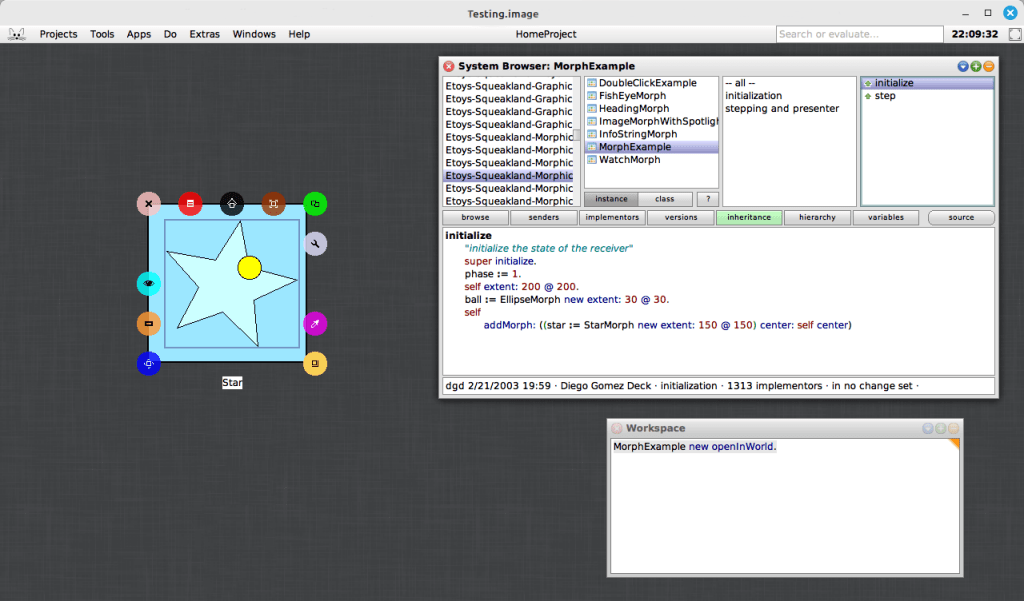
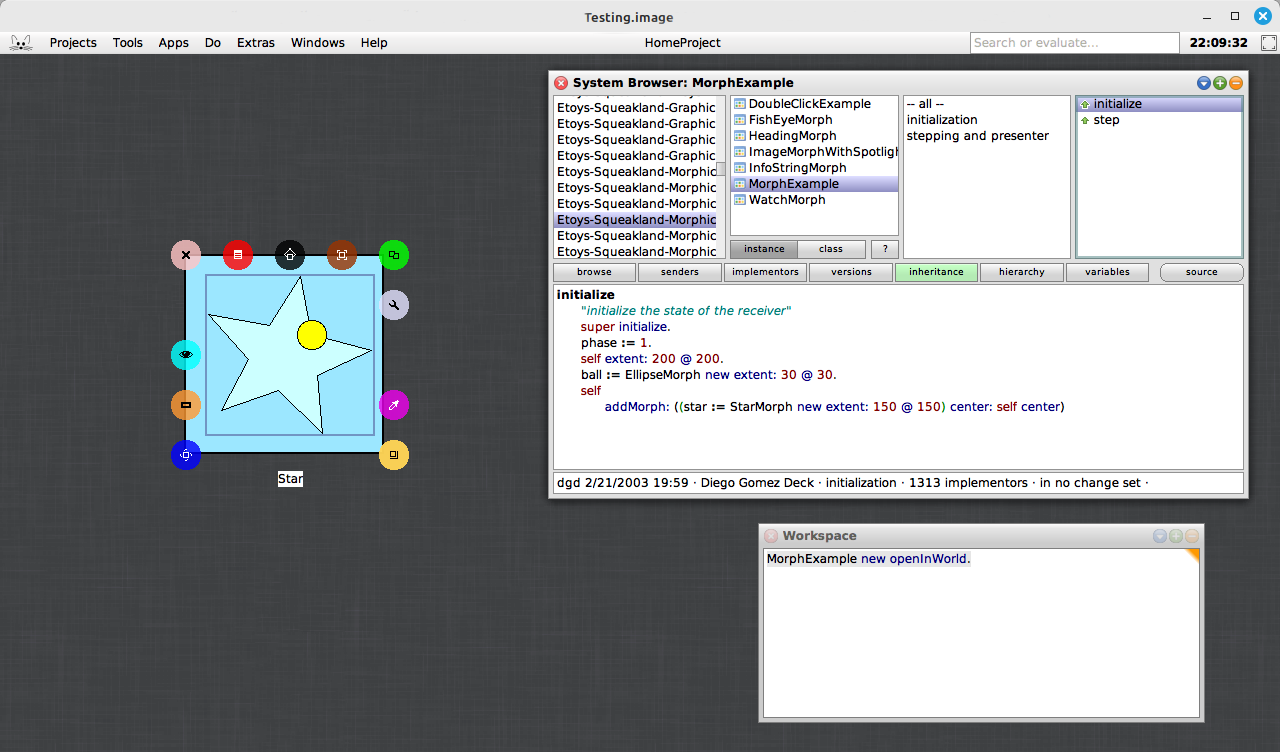
In addition to the video tutorial, you can explore a very simple, yet powerful example included in the Squeak image. This example morph can be found with the somewhat hard-to-remember name, MorphExample. By evaluating “MorphExample new openInWorld” (without the surrounding parentheses) in a Workspace, you can discover how easy it is to make morphs perform various actions. This demonstration emphasizes the beauty of the Morphic system’s simplicity: you do not need to write complex code to animate objects. Instead, you can focus on creating rich, interactive applications and interfaces with just a few lines of code.
One of the most compelling aspects of the Morphic system is how effortlessly it enables dynamic, real-time interaction, especially when used within the Smalltalk environment. Compared to many other graphical frameworks, where handling interactions often requires more complex event handling and manual updates, Morphic allows you to create interactive, animated objects with minimal code. For example, you can open a halo on the star, resize or rotate it, and the animation will continue to perform and adjust dynamically to the star’s new dimensions. This responsiveness highlights the simplicity and flexibility of the Morphic system, making it an ideal choice for building interactive systems without the need for manual recalculations or updates.
If you are interested in delving deeper into the Morphic system, you can access Chapter 12 of Squeak by Example for more detailed explanations and examples. The book offers a clear guide to the system, making it an excellent resource for developers looking to better understand Morphic. You can read the full chapter here.
For those who want to learn more about using halos with morphs in Squeak, there is another excellent video resource available. The video “Morphic Halo icons in Squeak Smalltalk” demonstrates how to interact with the Morphic halo icons to manipulate morphs in the Squeak environment. Whether you are new to Squeak or already familiar with the basics, this video provides valuable insights into how halos can be used to interact with morphs. Check it out here.
Have a great time with Smalltalk and keep on Squeaking!
In this lesson, we will learn about blocks in Smalltalk. A block is a small piece of code that can be treated as an object. It is often used to perform actions or calculations when needed. Blocks are written inside square brackets, and they can be passed around or executed by other parts of the program. While blocks are commonly used in programs to make things happen, for now, think of them as a way to understand how code can be organized and applied. This lesson is a simple introduction to blocks, so you do not need to fully understand everything about them yet. By the end of the lesson, you will have a better idea of what blocks are and how they work in code. You will also learn how to use blocks to interact with your EllipseMorph.
We will also use a simple button morph to interact with our EllipseMorph. By clicking the button, you will be able to make the EllipseMorph move. This lesson will show you how to create a simple graphical button that can then be used to interact with your morph. This is a nice way of interacting with the morph without having to do much coding for now. It allows you to focus on understanding the basic concepts before diving into more complex programming. As you progress, you will learn how to build more advanced interactions and customize the behavior of your morphs.
Additional Resources
For additional learning, there are several resources that can help you dive deeper into the topics we covered. You can start by exploring the Block Swiki page here to get a better understanding of how blocks work in Smalltalk. If you want to learn more specifically about the BlockClosure class, check out a detailed explanation here, also a Swiki article. Another helpful resource is the Terse Guide to Squeakonline, which is always available within the Squeak image under Help -> Terse Guide to Squeak. Lastly, the Squeak by Example book is an excellent resource for exploring Squeak and Smalltalk in more detail, and you can read it here. These resources will provide you with more in-depth information and examples to support your learning.
For the complete series of lessons on creating the Shooter Game, including all the necessary resources like PDFs, source code, images, sound files, and more, visit https://scottgibson.site/ShooterGame/. This site not only offers everything you need to progress but also lets you play the game directly in your browser using SqueakJS. Whether you are just getting started with Squeak/Smalltalk or are advancing your skills, these resources will help guide you as you progress through the game development process.
In this lesson, we will focus on making Morphs move, an essential step in creating interactive and engaging gameplay. You will learn how to send messages to Morph objects, enabling them to change their position on the screen. Movement is a key part of any game, whether it involves your ship, enemies, or projectiles. By the end of this lesson, you will understand different ways to move Morphs relative to a specific location, giving you basic control over their movement in your game.
To begin, it is important to understand how Morph movement is accomplished in Squeak, a version of Smalltalk, as not all Smalltalk implementations support Morphs, which is what we are using here. Squeak is an object-oriented language, meaning everything is an object. Objects can communicate with each other by sending messages, which is how actions and information are requested in Squeak. Much like how people communicate by sending messages to one another, objects in Squeak send messages to request actions or receive information, or both.
Understanding Messages in Smalltalk
In Smalltalk, there are three types of messages: unary, binary, and keyword. Unary messages have the highest precedence, followed by binary messages, and then keyword messages. These different types of messages help objects interact in various ways.
Unary messages are messages that are sent to an object without arguments.
Binary messages consist of special characters like +, -, or @, and each one takes exactly one argument to perform an action or computation involving two objects.
Keyword messages consist of one or more keywords, each ending with a colon (:), and each keyword takes an argument.
The Difference Between position: and position
In this lesson, you will focus on understanding how to use the position messages. The first important thing to know is the difference between two messages that seem similar but actually work in different ways: position and position:. They both deal with the position of Morphs, but they are used differently.
The message position, without a colon, is a unary message. It does not require any arguments and simply retrieves the current position of the Morph.
The message position:, with a colon at the end, is a keyword message. It can receive a value or an argument, which is used to change the position of the Morph.
This difference in how the messages are structured is important because it tells Squeak how to process them. The position message simply retrieves the current location of the Morph, while the position: message accepts an argument to set or change the Morph’s location.
Understanding How to Control Morph Movement
By understanding how messages work in Squeak, you can effectively control the movement of Morphs. Each message, whether unary, binary, or keyword, enables you to send specific instructions to objects, helping them change their state or position on the screen. This knowledge of messages forms the basis of interacting with objects in your game.
As you progress through the lesson, you will learn how to send different types of messages to Morphs, allowing you to interact with them in various ways. This skill will be crucial for making your game dynamic and interactive, enabling you to work with Morphs to create engaging gameplay elements.
By the end of this lesson, you will have a good foundation in how messages are used to control movement in Squeak, and you will be ready to apply this knowledge in your game.
Final Notes
Please remember to save your Squeak image after each lesson. This way, if you ever encounter a problem with your code, you can always close the image and reopen it from where you last saved it. It would be helpful to save your Squeak image after you have successfully completed each lesson, so you can always reopen the image from the last completed lesson in case something unexpected happens while proceeding through the current lesson.
Note that the extra parentheses in this lesson are not necessary, but they may help new learners visualize the objects conceptually, especially at the start. The syntax is still correct and can be adjusted later, so nothing harmful is being introduced. At this point, it seemed better to provide a visual, conceptual understanding through the code, rather than focusing solely on minimizing syntax. Future lesson code will not include these.
Lesson Resources
For the complete series of lessons on creating the Shooter Game, including all the necessary resources like PDFs, source code, images, sound files, and more, visit https://scottgibson.site/ShooterGame/. This site not only offers everything you need to progress but also lets you play the game directly in your browser using SqueakJS. Whether you are just getting started with Squeak/Smalltalk or are advancing your skills, these resources will guide you through each step of the game development process, helping you apply the techniques you learned in this lesson, such as moving Morphs and controlling game objects.
The holidays may be over, but the presents are still arriving from the UK Smalltalk User Group! Videos of previous presentations have been released over the past month, covering a variety of interesting topics–a total of 57 as of this writing! Be sure to check out their new YouTube channel at https://www.youtube.com/@UKSTUG. Also, be sure to visit their homepage at https://www.uksmalltalk.org/, and if you would like to attend any meetings, their Meetup site can be found at https://www.meetup.com/ukstug/.
Have a great time with Smalltalk and keep on Squeaking!
This article kicks off a series designed to introduce programming to beginners through the creation of a simplified space shooter game using Squeak, an open-source implementation of the Smalltalk programming language. By breaking down the process into a series of manageable lessons, the aim is to provide an accessible and interactive entry point into the world of programming. This series will guide learners through the process of building a game from the ground up while introducing them to essential programming concepts along the way. Upon completion, and with the accompanying resources such as source code, images, and a sound file, students will have everything they need to recreate or enhance the game.
Who This Series is For
The intended audience for this article and the accompanying series includes both young learners and adults who are new to coding or to Smalltalk. Whether you are a student, educator, or hobbyist, these lessons are tailored to make programming approachable and enjoyable. Throughout the series, we will dive into key programming principles – such as object-oriented design, the concept of “Morphs” in Squeak, and more – at a beginner-friendly pace. Each lesson is supplemented with practical examples. If you are interested in starting with something fun and educational, and you are curious about how games are made or how Smalltalk can be used in a modern development environment, this series is for you.
Why a Game, and Why Squeak/Smalltalk?
So why a game, and why in Squeak/Smalltalk? Why not? Everybody understands the domain of games, or gaming. That is, the mechanics, interactions, and goals – such as managing player input, controlling game characters, defining win/loss conditions, and creating interactive environments. Games are a universal medium that spans across ages and cultures, from simple board games to complex video games. This familiarity makes games an excellent starting point for teaching programming concepts, as the mechanics and goals are intuitive to most people. Moreover, games require a variety of programming elements to function, such as managing user input, handling graphics, implementing game rules, designing levels, and even creating sound and music. These components provide a rich environment for introducing and practicing key programming skills – like decision-making, loops, object-oriented design, and event handling – while keeping learners engaged with a fun, practical outcome.
Why Squeak/Smalltalk is the Right Tool
Squeak makes all of this very easy, and you do not need to learn anything more than Smalltalk to get started. The language is intuitive and enjoyable to use, and Squeak provides a powerful and engaging development environment. While games may not balance your bank account, they can serve as an excellent resource for learning programming or a new language. Squeak/Smalltalk, in particular, makes this process both accessible and enjoyable.
How This Series Came to Be
This article introduces a series of lessons based on a simplified version of a space shooter game I developed using Squeak. The project, which was both fun to create and my first full Squeak program, turned out to be an ideal way to teach my middle school-aged son Smalltalk, as well as the fundamentals of object-oriented programming (OOP). Although he had prior programming experience, he quickly grasped the language due to its simplicity and the interactive nature of the environment. The natural syntax of Smalltalk, combined with the user-friendly environment, not only made it easier for him to solve problems but also allowed him to be more creative, without needing to alter his natural problem-solving approach. Both the language and the environment “got out of his way,” enabling him to express himself more easily and effectively.
What Will Be Covered in the Series
The lessons in this series are designed to introduce key programming concepts – such as classes, methods, debugging, and user interface design – through the process of building and modifying a game. You can find the complete list of lessons on the Shooter Game site. Each lesson was written daily, and I discussed topics both before and during the lesson to provide additional detail and ensure a deeper understanding. This approach allowed me to offer relevant explanations exactly when they were needed, based on my son’s progress and evolving needs.
For each article, I will aim to provide additional helpful information that may not be included in the lessons themselves. If you feel any details are missing or could be useful, please let me know, and I would be happy to provide further information.
Interactive, Live Coding Approach
The hands-on, live coding approach in these lessons encourages learners to experiment and learn in real time, making the process both educational and enjoyable. Each lesson also comes with a downloadable PDF version of the lesson page for easy offline reference or printing. The entire series progressively builds upon itself, allowing learners to gradually develop their programming skills as they move through the lessons.
Lesson 1: Creating and Positioning Morphs
For today’s lesson, we will dive into the first step in building our game: “Creating and Positioning Morphs.” In this lesson, we will introduce the concept of a Morph and explore how to create and manipulate these visual objects within the Squeak environment. Understanding Morphs is a crucial part of game development in Squeak, as they serve as the foundation for all the interactive elements of the game.
What is a Morph?
In Squeak, a Morph is an interactive graphical object. Like everything in Smalltalk, a Morph can be interacted with through messages. It is not a static, lifeless image on the screen, but rather a lively object waiting to interact with its environment. You can send a message to a Morph to receive information about it or to perform an operation. Everything you see when running Squeak is a Morph object. This presents some very exciting capabilities, as it provides you with the ability to create graphical objects, which can interact with the world (the entire Squeak environment – its display screen in this case) and the world can interact with them.
The Squeak world works using a coordinate system. The coordinate values can be absolute or relative. Each coordinate value is represented as a point, which has an X coordinate and a Y coordinate. For example, a Squeak world (remember, this will be the full size of the display screen in the Squeak environment) with a display size of 1024×768:
The point 0@0 is the top-left corner of the screen.
The point 0@768 is the lower-left corner of the screen.
The point 1024@768 is the lower-right corner of the screen.
The point 1024@0 is the top-right corner of the screen.
Every point in between represents a location within the world. Points can exist outside of that world too; however, they would not be visible.
In this game, everything is a subclass of Morph, so you will be using Morphs a lot.
Before beginning Lesson 1, it would be very helpful to read Chapter 1 of the Squeak By Example book (available as a free PDF, SBE-6.0.pdf), an excellent resource for learning Squeak and understanding its environment. Afterward, you can go straight to the lesson here.
Additional Resources
To access the full series of lessons and resources for the space shooter game, Shooter Game, visit the lesson site at https://scottgibson.site/ShooterGame/. There, you will find the complete set of lessons and their associated PDFs, along with the source code, images, the sound file, and other useful resources. You can even play the game directly in your browser (using the awesome SqueakJS!). Whether you are a beginner or looking to learn more about Squeak/Smalltalk, its environment, and its tools, these resources will guide you through each step and provide everything you need to recreate or enhance the game.
In recent months, Craig Latta has been exploring the integration of AI language models, particularly GPT-4, into Smalltalk development environments, with the goal of enhancing workflows and improving conversational interactions with the language model. Rather than relying on traditional coding methods, Craig has focused on fine-tuning the model using English system prompts, with promising results. This approach aims to guide the AI’s behavior through prompt evolution, rather than direct coding, leading to surprisingly effective outcomes.
One of the key insights from this experimentation is that GPT-4’s pre-existing knowledge of Smalltalk and Squeak provides a solid foundation for further fine-tuning. By applying constraints to system prompts – such as instructing the model to avoid sending messages to access objects when direct access via instance variables is possible – Craig has steadily refined the AI’s responses.
Conversing with the Language Model in Squeak
A central goal of the project was to enable conversations with the AI model from within any text pane in Squeak, utilizing Smalltalk’s classic “do it,” “print it,” and “inspect it” functionalities. To achieve this, Craig modified the Compiler>>evaluateCue:ifFail: method to handle UndeclaredVariable exceptions. When an undeclared variable (e.g., “What” in “What went wrong?”) triggers an exception, the model object underlying the text pane takes over, interpreting the next chat completion from the language model.
The model objects Craig has focused on are instances of Smalltalk’s Debugger and Inspector. A notable feature of this approach is that it logs all interactions – whether English prompts or Smalltalk code – into the changes log, just as it would with traditional code. Each model object maintains a reference to the most recent chat completion, allowing successive prompts to be interpreted in the context of the entire conversation, fostering dynamic and evolving dialogues.
Practical Results and Application
The system has already shown practical value in a live development environment. For example, when evaluating a prompt like “What went wrong?” in the debugger, the language model provides surprisingly accurate and detailed responses, as if debugging the code itself. Similarly, when tasked with generating Smalltalk code – such as instructions for selecting the most recent context with a BlockClosure receiver – the debugger manipulates the code correctly, demonstrating the viability of using the AI in real-time development workflows.
Future Exploration
Currently, Craig is expanding the scope of the AI’s functionality. He is experimenting with prompts that describe the application’s domain, purpose, and user interface, eager to see how the model can assist in these areas. This exploration has the potential to significantly improve Smalltalk development workflows by integrating AI-driven conversational interactions into the process.
As AI models continue to evolve, Craig anticipates further advancements in integrating these models with development environments, offering new opportunities to enhance productivity, troubleshooting, and even code generation. The future of AI-enhanced Smalltalk development looks promising, and this project represents an exciting first step. For more details on Craig’s exploration of AI in Smalltalk development, be sure to check out his full blog post at thisContext.
Growing Interest in AI for Squeak Development
There has been growing interest in applying both semantic understanding and generative AI to the Squeak environment, as these technologies hold great promise for improving development workflows. By combining the ability to generate code with deeper understanding and reasoning, developers are beginning to explore new ways AI can assist with both writing and debugging Smalltalk code. This integration could help streamline development, enhance debugging efficiency, and even assist in explaining complex code patterns, all within the context of Squeak’s unique environment. Or, it could take over the world. You decide. As interest continues to grow, a future article and video from a recent demonstration will explore these advancements in more detail, offering insights into how AI-driven approaches can enhance Smalltalk programming and provide practical demonstrations of these evolving tools.
Have a great time with Smalltalk and keep on Squeaking!