Work has progressed with SqueakJS since our last report in April. In May, version 1.2.1 was released, adding a virtual Cmd button and fixes for touch events. The June release, version 1.2.2, made the copy-and-paste menu items functional on mobile devices. The most recent version, 1.2.3, was released in September, bringing a touch keyboard and other minor fixes.
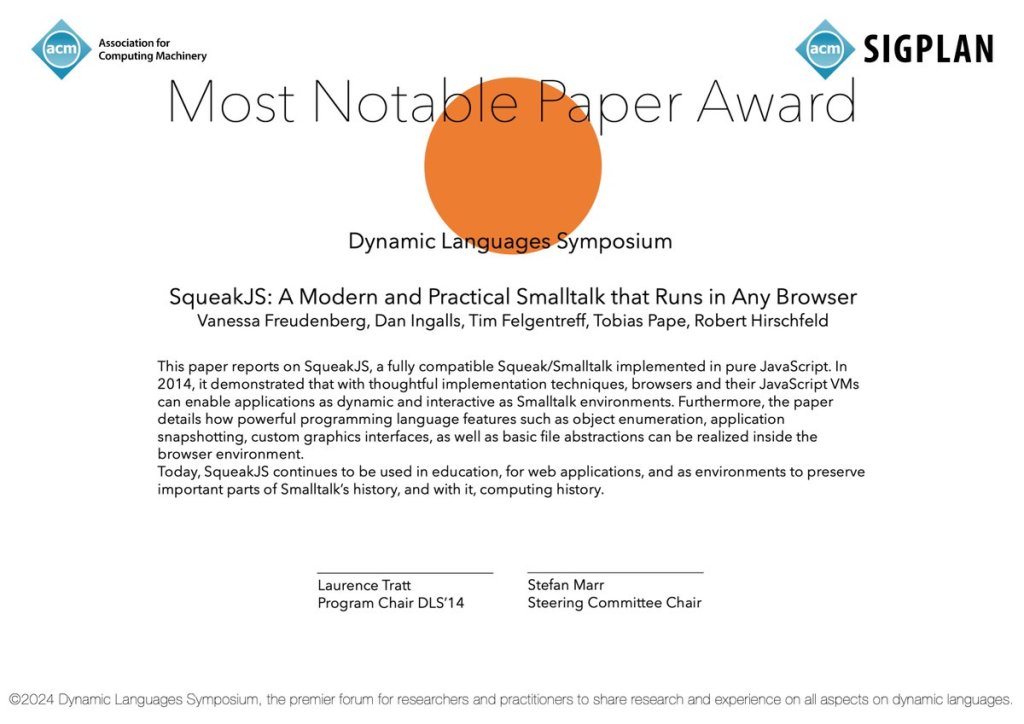
Additionally, we would like to extend congratulations to the SqueakJS project! The Dynamic Language Symposium (DLS) awarded SqueakJS this year’s DLS Most Notable Paper award for the paper “SqueakJS: A Modern and Practical Smalltalk that Runs in Any Browser,” authored by Vanessa Freudenberg, Dan Ingalls, Tim Felgentreff, Tobias Pape, and Robert Hirschfeld. You can read the paper here, and also view the announcement here.
Work continues to progress with SqueakJS, and we are grateful for it. The project leverages web browsers as the primary platform, enabling applications to run directly without the need for native software installations. This feature ensures easy deployment and access, making it ideal for environments where installing traditional software is not possible or practical.
SqueakJS is an HTML5 runtime engine for Squeak/Smalltalk, written in pure JavaScript. It is also compatible with many other OpenSmalltalk-compatible images. Check it out at https://squeak.js.org. If you would like to contribute, head over to https://github.com/codefrau/SqueakJS and see what you might like to help with. Contributions are welcome!
Have a great time with Smalltalk and keep on Squeaking!
When developing complex systems, encountering errors that leave your project in a frozen state can bring much sadness and consternation. For developers working with Squeak/Smalltalk, a frozen image refers to a situation where the system becomes unresponsive. This can happen due to various issues, including deadlocks, infinite loops, or recursive operations in Smalltalk code, which can cause the VM to freeze, hang, or lock up.
A recent discussion in the Squeak community highlighted how one such incident, caused by a stuck semaphore during an image load, turned into an opportunity for both recovery and valuable practices in safeguarding against future mishaps. You can explore the full conversation in the Squeak-dev mailing list thread (here).
The Problem: Semaphore Deadlock in the Image File
In this case, a developer encountered an issue while attempting to draw in multiple background threads, using a chain of semaphores to manage the UI thread. After resolving an error in one of the background threads, the drawing process was resumed. However, it was found that the image would fail to load. Instead of opening, the image became unresponsive and effectively “frozen.” It had likely become stuck due to a semaphore waiting for a signal that would never come. This left the image unresponsive and effectively unusable – or so it would have seemed.
Recovery Options: DoItFirst and Debugging
The good news is that there are several options available for recovering from such failures.
For developers dealing with frozen images at startup, Squeak provides a mechanism called DoItFirst. This is a class that is processed at the very beginning of the image startup sequence, allowing developers to inject custom code or actions before the main system fully loads. By using command-line arguments like --debug, it is possible to force the image to enter the debugger at the earliest point in the startup process, allowing issues to be diagnosed and fixed before the image fully loads.
Additionally, for situations where the issue is well-understood, the --doit option allows Smalltalk expressions to be passed and executed before any problematic behavior occurs, giving developers a chance to resolve issues before they impact the image during loading.
Another option is to open the Virtual Machine (VM) in a debugger. In the specific case of a stuck semaphore, you can set a breakpoint in interpret. Run the VM until it reaches interpret a second time (the first invocation does some initialization). At this point, you can use printAllProcesses to locate the stuck process. This should display the semaphore the process is waiting on. Once identified, you can invoke synchronousSignal with that semaphore to unstick it and restore functionality without losing significant progress. While this technique can specifically handle a stuck semaphore, it could also be helpful for other cases of system hangs or unresponsiveness.
The Importance of Backups and Versioning
While debugging and recovery tools are invaluable, it is clear that prevention is equally important. Routine backups and effective versioning are essential practices that can mitigate the risks associated with frozen images and other failures. One practice that proved helpful in this case was maintaining regular system backups, which made it possible to quickly restore a previous version of the image with minimal data loss. However, more granular versioning, especially in environments with frequent risky changes, would provide an additional layer of safety.
Specifically, incremental versioning of the image can be a lifesaver when things go wrong. By saving a new version of the image each time a meaningful step in development is reached, developers can create a clear history of their work. This allows them to revert to earlier versions of the image if issues arise, minimizing the impact of failed changes and speeding up the recovery process. Incremental image saves help ensure that even if an image becomes frozen or corrupted, a previous, stable version can be restored with minimal effort.
The Robustness of Squeak: Multiple Recovery Options
One of the key takeaways from this experience is how robust Squeak is in terms of recovery options. Even when a frozen image occurs or the system becomes unresponsive, Squeak offers multiple layers of recovery mechanisms. Whether using DoItFirst to inject custom code during startup or interacting with the VM through a debugger to manually resolve issues with semaphores, there are a variety of ways to recover from errors and get back on track.
Additionally, Squeak’s development environment is designed to be highly flexible, encouraging experimentation while ensuring that recovery is always possible. One of the key advantages of Squeak is that all the code executed or saved during development is stored in the .changes file. This makes it possible to recover from almost any issue, as the system is built to retain all your code. Even if an image becomes frozen or corrupted, the code itself is never truly lost. With the resources mentioned in this article, developers can restore their environment and continue their work. In Squeak, code is safe; no matter what happens to the image, your code can always be recovered.
Conclusion
In conclusion, while Squeak’s development environment offers tools to recover from serious errors, the most effective defense is good preventive practice: maintain regular backups, version your work consistently, and always be mindful of the unexpected.
For more detailed information on using DoItFirst to debug and recover your Squeak image, visit the DoItFirst Swiki page (here). If you encounter issues like crashes or freezes in Squeak, there are various levels of potential failure to consider, and helpful guidance is available in the What to do if Squeak crashes or freezes resource (here), which offers insight into diagnosing and resolving different types of system freezes or crashes.
Have a great time with Smalltalk and keep on Squeaking!
In a recent email to the Squeak developers mailing list (here), Tim Rowledge shared insights from the Raspberry Pi team regarding beneficial tweaks to memory configuration in the firmware, specifically focusing on NUMA (Non-Uniform Memory Access). These updates are part of ongoing efforts to enhance SDRAM performance for both Raspberry Pi 4 and 5 models.
Performance Enhancements Explained
Recent testing revealed that the 8GB models sometimes performed worse than the 4GB models due to SDRAM self-refresh consuming bandwidth, especially since larger sizes require longer refresh times. Investigations showed that adjusting the SDRAM refresh interval could yield better results. Monitoring temperature indicated that a faster refresh rate was feasible, which helped reduce overhead. Micron confirmed that 8GB SDRAM could safely operate with 4GB refresh timings.
Ongoing tweaks to SDRAM and ARM settings have led to small but cumulative performance improvements, typically around 1% per update. A significant issue noted is the competition among multiple ARM cores accessing SDRAM, leading to inefficiencies when multiple pages in the same bank are accessed. Implementing NUMA can help manage this by splitting SDRAM into regions, allowing for more efficient allocation and improved performance in multi-core tasks.
Benchmarking Squeak Smalltalk
Tim tested these configurations on a Raspberry Pi 5 equipped with NVMe storage, running benchmarks from the Benchmark Shootout suite. The tests included:
nbody
binary trees
chameneos redux
thread ring
Results of the NUMA Configuration
The performance comparisons between a NUMA-configured Raspberry Pi 5 and a standard setup yielded notable results:
nbody: Improved from 5.157 seconds to 5.095 seconds (1.2% improvement)
binary trees: Improved from 3.398 seconds to 3.096 seconds (8.9% improvement)
chameneos redux: Improved from 7.274 seconds to 5.239 seconds (28% improvement)
thread ring: Improved from 8.347 seconds to 7.783 seconds (6.7% improvement)
These findings indicate that even minor adjustments in RAM timings can lead to substantial performance gains, particularly highlighted in the chameneos redux benchmark.
Conclusion
Tim Rowledge’s testing of the Raspberry Pi team’s memory configuration tweaks has revealed valuable performance gains. By implementing NUMA and optimizing SDRAM settings, Raspberry Pi users can unlock significant benefits. These small adjustments can lead to meaningful improvements, making the Raspberry Pi an even more effective tool for development and education. You can find Raspberry Pi team’s recommended tweaks here. Additionally, you can explore the bug report thread detailing the testing and findings here.
Have a great time with Smalltalk and keep on Squeaking!
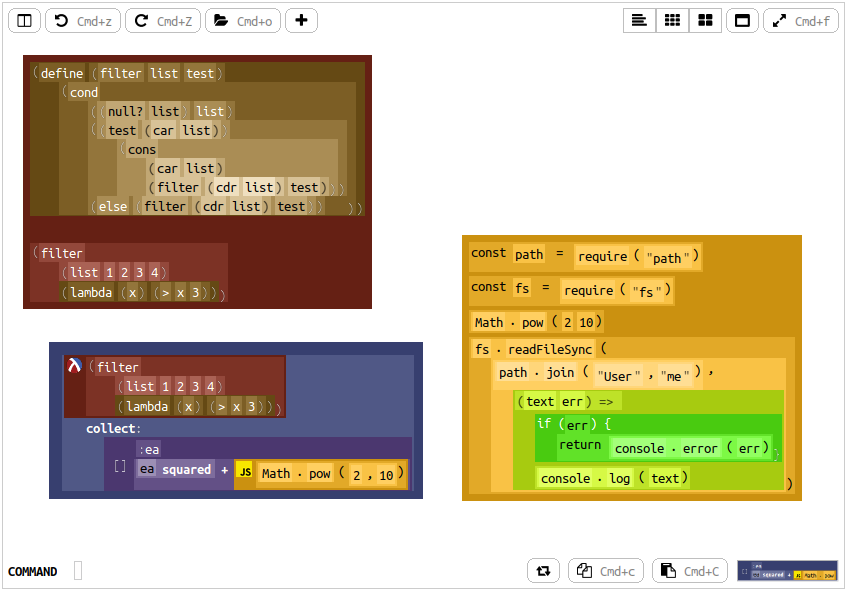
Sandblocks is a projectional, block-based programming environment written in Squeak/Smalltalk.
Projectional editors are promising for tasks like language composition and domain-specific projections. Effective user interaction requires clear communication of program structure and supported editing operations. While making the abstract syntax tree visible can enhance clarity, it often leads to increased space usage and potential usability issues. Sandblocks is an early prototype of a tree-oriented projectional editor for Squeak/Smalltalk, which aims to minimize space while clearly visualizing the tree structure.
For more information on projectional editing, you can start by reading Martin Fowler’s explanation (here), in which he describes it as an alternative to source editing.
Give it a Try!
You can find the simple installation instructions on the project page here. The page specifically mentions Squeak 5.3, but it seems to work similarly well with Squeak 6.0. Sandblocks is a research prototype, so be sure to save often while working with it.
Have a great time with Smalltalk and keep on Squeaking!
Roguerrants is a game engine for interrupted real-time 2.5D (parallaxed top-down) roguelike games, developed by Stéphane Rollandin, and is written in Squeak/Smalltalk. Stéphane announced on the Squeak developers list (here) the availability of Roguerrants on itch.io.
A “Roguelike” game is a sub-genre of RPGs, named after the classic 1980 game “Rogue.” It is defined by features such as dungeon crawling through procedurally generated levels, turn-based gameplay, grid-based movement, and the permanent death of the player character. Roguelikes have evolved over time, inspiring numerous variations and modern interpretations, often referred to as “roguelites,” which may incorporate elements like permanent upgrades or less punishing death mechanics.
The Weekly Squeak reached out to Stéphane Rollandin, who generously shared details about the development of Roguerrants.
What led you to use Squeak to develop a game? How is Roguerrants different from something you would have created using another programming language?
I have been working with Squeak for the last twenty years. I could just not work with anything else. I’ve been spoiled.
I first came to Squeak to port GeoMaestro, a system for musical composition based on geometrical structures that I made in the KeyKit MIDI environment. In KeyKit there are classes and I first met object-oriented programming there.
Someone from the csound-dev list I think told me Squeak would be a good fit for me, and this is the best piece of advice I have ever been given.
So I first used Squeak for music. GeoMaestro became muO, which is a huge system that eventually allowed me to compose my own pieces, although I have no musical education and no playing talent whatsoever.
In muO I did a lot of graphical stuff, and notably a family of interactive editors that evolved into the ones I use for Roguerrants maps and geometrical structures (navigation meshes for example).
muO taught me Morphic, which I believe is an incredibly underestimated pearl. It’s a beautiful framework. It’s amazing. I know a lot of people in the Squeak community (and even more in the Pharo one) think of it as a pile of cruft that needs to be reconsidered completely, but to me it’s just a wonderful framework.
Roguerrants is 100% a Morphic application. Without Morphic, I could not have done it at all. And without the tools I made for muO, I would not have considered building a system that ambitious.
Regarding graphics and sound, how do you implement these elements in Squeak? What advantages does the environment offer?
So, graphics are pure Morphic and BitBlt. I just tweaked a few things to make them faster, and made a few fixes. I had a hard time with composition of alpha channels, notably.
The advantages of Morphic is the natural division of tasks, where each morph draws itself. Graphics are naturally structured; more about this below.
Sound is also supported natively in Squeak. In muO I did mostly MIDI, and some Csound, but also a little audio synthesis so I known the sound framework quite well. I fixed a couple bugs there too. And I made editors for sound waves and spectra.
In Roguerrants, each monster class uses its own synthesizer and actually plays musical notes. Its utterances are composed with muO. I can generate adaptive music, although this is still in an early stage.
The concept of free motion and an organic grid is intriguing. What motivated you to incorporate these elements in Roguerrants, and did you encounter any challenges during their implementation?
I like things to be free from grids, in general. But grids are useful, so the main point is to be able to treat them as a game component just like another instead of having them being the paradigm everything happens within.
In Roguerrants everything happens in real-time and is located via the plain morphic coordinates system. That’s the base. The grid comes second. The turn-based structuration of time also comes second. In fact, the whole of Roguerrants comes second to Morphic itself. The game playground is just a single morph. The time evolution is the Morphic stepping system, no more, no less.
Organic grids are relaxed Voronoi tesselations that take into account the surrounding of the controlled character. The challenge there is make them seem natural to the player.
For example, the grid should not feature cells at places the player do not see (because it may give the player hints about what’s there) but this is a subtle issue, because some of these places have been seen recently, so why no allow access?
There are also different ways the grid adapts to what the player does.
For example, not all cells in the grid are reached at the same speed. If the player makes a small move, it will also be a slow move. This is to prevent the player from abusing the turn-based system by being too cautious. On the other hand, a long move is faster: the player is running. This makes sense if you remember that once the move is chosen, it cannot be interrupted; if a source of danger is encountered during a move, too bad.
How does the grid adapt to that? Well, the base navigation grid is generated within a specific radius around the player. If the player runs close to its border, the grid for the next turn will have a smaller radius: the player will not be able to run twice in a row. One turn is needed for resting somehow. This creates a nice ebb and flow in dangerous situations.
Another example: when the player character is stunned, its navigation grid has larger cells. The stunned condition has several effects, and one of them is to make the player more clumsy in the way it moves.
So a lot can go on when one thinks of what it means to be provided a navigation grid generated differently for each turn. I am still exploring what can be done there, and as I said the challenge is to make all the mechanics invisible to the player, yet there in an intuitively meaningful way.
Generating graphics without a tile-based system is a unique challenge. How did you tackle this issue in Roguerrants?
Let’s see this from the point of view of Morphic, again. A morph can have any shape and size. You just put it on the World, and that’s it. It can draw itself, so it handles its own part of the overall display.
So in that sense it is not a challenge at all, just the morphic way.
Now there is a little more to it.
As I said above, the game playground is a morph (a subclass of PasteUpMorph, the class of the World). It has a very specific way to draw itself, unique in the world of morphs. For one thing it draws it submorphs layers by layers, allowing the 2.5D parallaxed display, and also it allows any of its submorphs to paint anywhere.
So in addition to drawing itself, a morph in Roguerrants can decorate part of all of the game world in its own way. That’s how the ground is displayed for example.
High-level components like activities and missions can significantly affect gameplay. How do these elements drive character behavior in Roguerrants, and what distinguishes your approach?
This is one of the most involved technical points.
First there is ModularAgency. This is a design for giving any object an arbitrary complexity, in a dynamic way. I do not have the room to discuss this further here, but there is a lot to say; it is the core design of Roguerrants, and definitely one of the things I am the most proud of. It is a kind of ECS (entity component system), but a very unique one.
Via its #agency, a SpriteWithAgency (the subclass of Morph that all game actors are #kindOf:) has a dynamic library of components, each attributed a specific responsibility. There is really a lot of them. At the time of writing, there are 165 implementors of #nominalResponsibility, which means there is that number of different, well identified, aspects of the game that have a dedicated component. A NPC has around 25 to 30 components.
Among them are the ones responsible for its #activity and #mission.
The #activity component directly drives the #deepLoop component, which is the one that handles the #step method of a Sprite.
For example, if the #activity of a goblin is a journey, it will ultimately add to the goblin #deepLoop, at each morphic step, a command for changing its position and its orientation.
Now this is just the end point of a complex computation, because to do so it needs to know where to go, and so it consults the goblin #destination component, it asks the game #cartographer to produce a navigation mesh and do some A* magic there [ed. A* is popular algorithm used to find the shortest path from a starting point to a goal point on a graph or grid], it asks its #collisionEngine if there is any obstacle in the way, and if there is one that hinders the journey it delegates the problem to the #journeyMonitor component. You get the idea.
But the journey may need to be interrupted, or even discarded entirely. An activity is a moment-by-moment thing, it does not have a broad scope in terms of the overall behavior of the agent.
When an activity signals that its job is done, the #mission component gives the agent another activity. It is the #mission that implements what the agent behavior is about. Two agents can have a similar activity, like going from point A to point B, but very different missions: one can be heading to a chest to fetch something, while the other one is actively hunting the hero. Their activities at a given time are what their respective missions told them to do; they will be given very different activities after they arrive at their destinations.
When a mission is accomplished, the #mission component removes itself, and in the process it installs a specific kind of activity, an idle activity. The idle activity gives the agent a new mission.
So there is an interplay between mission and activities. Both components taken together make an agent do something in a well-defined context.
Then there are quests. Quests are components that give an agent a set of goals. They push the narrative forward. They can give missions. At the level of quests, we deal with the “why?” of an actor behavior. That’s the level of the story, of the game scenario.
Implementing original systems often comes with its own set of difficulties. What challenges did you face while creating your geometry- based combat and magic systems, alongside a high-level architecture for actor behaviors?
It’s not exactly a challenge, but computational geometry is tricky and it takes some time to get it right. Roguerrants uses convex polygons a lot, so I had to implement all related algorithms. The most complex one was Fortune’s algorithm for Voronoi partition. It took a lot of revisiting to make it stable and understand its domain of usability.
So why polygons?
In roguelikes, combat happens upon collision: you move your character towards a monster, there is an exchange of damage according to your stats and the monster stats, and life points are lost.
Collisions in a grid system is based on the grid connectivity: you collide with neighbor grid cells.
When moving freely, with an arbitrary shape, collision is more a geometry test: are polygons intersecting? So at this point, it made sense to me to have weapons, armor and hurt boxes also collide, individually.
When a character yields a sword, that sword attaches an impacter to the agent. The impacter is a polygon convering the area where the sword deals damage.
A creature has one or more hurt boxes (also polygons). If a weapon impacter overlaps one of these boxes, damage is dealt. And then, the impacter enters a cooldown period during which it becomes inactive. Armor works similarly.
The magic system uses geometry in another way.
Let’s take for example the Ring of Blinking. When equipped, the player character can teleport itself to a nearby location. What are its choices? It could be a grid, like the one used for navigation. But blinking is a powerful ability, so it’s better to give it some limits, and even make it dangerous – that’s much more fun. We can do that with geometry.
The places the player can blink into are a set of polygonal areas arranged in a mandala. When the blinking ability is not in cooldown, these places are small. Each time blinking is used, they grow. As time passes, they tend to get smaller again. If the player blinks too often, its mandala will feature very large regions. Blinking into a region only guarantees that you will land inside, not where. And so the more often you blink, the more you risk to teleport at a bad place, possibly even inside a wall or a rock (and then you die horribly).
Different abilities have different mandalas and different uses of their polygons. The exact mandala you get also depends on where you are, because magic is also a negociation between an actor and its surroundings. Some places forbid, enhance or degrade magic. This dimension of the game will be expanded a lot in the future, because it informs its tactical aspects.
The inclusion of biomes as first-class objects is a compelling design choice. How does this decision enhance the logic and functionality of your game?
This is a natural consequence of the way spatial partition is implemented.
Game maps in Roguerrants can be limited, or unlimited. Even when limited, they may be large. For this reason, they usually are not completely spawned. Parts of a map are suspended, waiting to be populated and made alive when the player, or another important actor of the game, approaches them. When they are not useful anymore, they get suspended again.
This means maps are modular. There is usually a top tesselation of large convex polygons, which may be hexagonal. Often each polygon is itself subdivided in regions, and this goes on down to the desired granularity.
At each region or subregion is associated a modular agency, called a local power. Local powers have many components, notably the component responsible for spawning and despawing game objects living in the corresponding region.
Local powers are very important. They are actors, invisible to the player, that inform a lot of what happen in the game, anything actually that is related to location. It is dark there? Who lives there? What is the nature of this place? Etc.
And so it makes sense that for a biome to be a component of a local power. Imagine a forest surrounded by fields, a forest that get denser at its core. Let’s say the whole map is an hexagonal tesselation. We give a biome to the hexagonal cells for fields, and another biome for the forest cells, plus yet another biome, probably a child of the former one, for the forest core. We then ask each cell to generate trees – that’s one line of code. The component(s) responsible for spawning trees is looked-up via the biomes. Fields will not generate trees, forest cells will generate them, and dense forest cells will generate a lot of them. Rocks will be different in fields and forest, etc. The different creatures that appears in the game will also be looked up via the biomes – snakes in the fields, giant spiders in the core forest, etc.
How did your design philosophy for Roguerrants shape the features you chose to implement in the game?
The design philosophy can be summarized in a few principles:
Each notion, each concept, each dimension identified as orthogonal to the others in the game design must be reified into an object (often a component) responsible for its implementation
It should always be possible to go deeper in said implementation.
It is nice to preserve the variety of ways it can be implemented.
For example, collision. What objects in the environment should we consider as potential obstacles? How do we test for actual collision?
The answer is to not look for The One Way To Collide, but instead to provide the tools (including the conceptual ones) allowing to express the problem effectively, and then use them to build the different answers adapted to different contexts.
So for example, a large group of gnomes, of an army of goblins, will bypass a lot of collision tests, so that they do not lock themselves into some ugly traffic jam. They will interpenetrate a bit.
A projectile, which is fast and small, will not test its collision in the same way as a big and slow monster. The projectile will consider itself as sweeping along a line and look at the intersection of that line with surrounding objects. The monster will look for the intersection of unswept polygons. Also the projectile has a target, of which it is aware, so it will take special care of it.
When riding a monster, a goblin will delegate the collision responsibility to the monster. No need to do anything, it’s just the rider.
A character moving along a path computed from a navigation mesh do not need to test for collision against walls – the mesh already took them into account.
But a character driven in real-time, via the mouse, by the player, do need to consider walls. It has a different #collisionEngine component.
Now if this mouse-driven character is blocked, lets says when attempting to move between two trees, it is maybe because the path is narrow and the player did not find it (sometimes this is a matter of pixels). At this point the collision engine interacts with the #cartographer (the component responsible for computing navigation meshes) and checks if indeed a path exists. If it does, it follows that path and succeeds in moving between the trees. The player did not notice anything. Computer-assisted driving! That’s point 2 above: it is always possible to go deeper in the implementation.
So when implementing a new feature, the first task is to express what I want to do in terms of the notions already reified in the game engine. If a new notion is introduced by the new feature, I create the corresponding components, maybe refactoring and refining the existing ones.
Then I come up with a lousy implementation of the feature, and live with it for a while. When I’m fed up with the ways it does not work well, I go deeper, I do it better. I am constantly revisiting existing features and the way all components interact together, which is only possible because refactoring in Smalltalk is so painless and easy.
Looking ahead, what enhancements or new features do you envision for Roguerrants?
First of all, I want to expose all the features that are already there. That’s why I released two projects on itch.io:
One is Roguerrants, the game engine.
The other one is a game. It is called, tongue in cheek, The Tavern of Adventures, and at the moment it is very primitive. I intend to grow it into something fun that will illustrate a lot of systems that are hidden in the engine at the moment. For example, you can fly. You can also control a party. You can play board games. There are rivers and lakes, lava pools, bottomless pits, basilics, dolmen, villages… You can trade and exchange intel with NPCs. You can have procedurally generated, evolving scenarios. Victory conditions that are not known in advance.
Then, for the future, I can see two main features coming for the game engine.
One is adaptive music. I would like the game to generate its own music. This is a long-term goal, and where I will go back full muO.
The second is a declarative API. A very simple format, even usable by non-programmers, to create custom games. I have already begun this, and the little I implemented already gives me a huge boost in the speed of game contents generation.
Player experience is a crucial aspect of game design. What do you hope players take away from Roguerrants, and how do you see their experience evolving as you continue to develop the game?
Well at the moment I do not have a game for them. I only have a game engine. I first need to upgrade Tavern of Adventures to a proper gaming experience, with tactical situations, exploration, meaningful decisions and a bit of strategizing. We’ll see how it goes.
Try It Out!
If you are interested in exploring the capabilities of Roguerrants and experimenting with its features, you can find more information about the project on its official itch.io page here. Stéphane also mentioned The Tavern of Adventures, which can be found here. Additionally, do not forget to check out the muO project (here), which focuses on musical objects for Squeak, offering a unique dimension to your creative explorations. We encourage you to dive into these exciting projects and do not miss the opportunity to explore the innovative possibilities they offer!
Have a great time with Smalltalk and keep on Squeaking!
Dear Squeakers, Smalltalkers, and friends of object-oriented, interactive programming environments!
We cordially invite you again to our annual meeting of German-speaking Squeakers (Squeak Deutschland e.V). It will be filled with exciting lectures, demos, and discussions led by both us and you, while also serving as the general assembly of the association. If you want, you can end the meeting with us in the evening in a cozy atmosphere in a nearby inn.
Should I register?
Do you want to participate or do you have any questions or do you even have an idea for demo / lecture / discussion? Get in touch with us so we can plan better. We would like to remain flexible in terms of time and would plan about 15 to 45 minutes for orientation for each lecturer.
For participation on site, please register by informal email to: marcel.taeumel@hpi.de
When do we meet?
Saturday, November 2, 2024, from 1 p.m.
Where do we meet?
We will hold the event in a hybrid form. After registration you can find us on site:
Hasso Plattner Institute for Digital Engineering gGmbH Prof.-Dr.-Helmert-Str. 2-3 14482 Potsdam
It was 28 years ago today when an email (Swiki copy here) was sent to comp.lang.smalltalk by Dan Ingalls with the subject “Squeak – A Usable Smalltalk Written in Itself,” marking the first announcement of Squeak to the world. In his email, Dan announced the release of Squeak with the intent to promote collaboration with academia and industry. Squeak began on a reconditioned Smalltalk-80 system from Apple’s ST-80. Notably, the implementation was written almost entirely in Smalltalk. Beginning with the Blue Book spec, a 32-bit direct pointer Object Memory and incremental garbage collection was added. Additionally it included a color BitBlt, a portable file system, and basic support for polyphonic music synthesis. Contributions were welcome, and the rest, well, is ongoing history.
We would like to acknowledge the invaluable contributions of all who have supported the project. In celebration of this milestone, we reached out to several current contributors, who then also shared this request with others to gather their thoughts on this occasion.
Alan Kay, for this celebration, emphasized several noteworthy contributions that the creation of Squeak and the achievements made for it brought to the community, which he believed deserved recognition. The highlighted contributions were:
Self-Bootstrapped – One of the most remarkable features was Squeak’s bootstrapping process, which allowed the environment to be constructed and run entirely on its own code. This self-hosting capability not only facilitated rapid development but also ensured flexibility and adaptability without reliance on external systems.
Freed from Xerox Ownership – The transition from Xerox ownership to independence was made possible by a special arrangement for the original developers of Smalltalk-80. This agreement enabled them to retain rights and forge a new path for the language, ultimately leading to the creation of Squeak. The developers were determined to continue the Smalltalk tradition while expanding its capabilities.
MIT Licensing – An important moment for Squeak came when design expert Don Norman helped secure a licensing deal that positioned Squeak under the MIT License. This permissive license encouraged a broad community of developers to contribute and collaborate, making Squeak accessible for educational and commercial purposes alike.
Rapid Multi-Platform Deployment – The combination of its innovative bootstrapping approach and strong community support allowed Squeak to achieve impressive cross-platform compatibility. Within just a few months of its initial release, Squeak was operational on all major operating systems, including macOS, Windows, and various Unix distributions. This rapid deployment not only expanded its user base but also solidified its status as a versatile tool for developers and educators.
We extend our heartfelt gratitude to Alan Kay for highlighting these significant achievements of Squeak and recognizing everyone who played a role in its development.
Göran Krampe – “I haven’t used Squeak or Smalltalk for many years. But I fondly remember the time I was heavily involved in the Squeak community, it was fun and warm and I got to know a lot of very sharp and interesting people. I got smitten by Smalltalk around 1993 when I studied Computer Science at KTH in Stockholm. I still consider Smalltalk to be my ‘home language’ which I feel the most at ease in. Eventually I got interested in other languages like Nim and Dart and I ended up trying to implement a simple Smalltalk-like language myself. Last time I really worked with Squeak I worked together with Ron Teitelbaum on the system called Teleplace (renamed many times!) originating from the Croquet project.
“Now, looking at the programming future and daring to make some observations or predictions, there are some obvious trends I think I see…there are so many different areas of software development where Smalltalk still can have an edge, for example in complicated simulation or interactive data exploration scenarios. I think that is where interesting options can be found…Squeak and Smalltalk with the image model and the highly flexible and malleable development environment has a great opportunity right now in tapping into AI…if I would be looking at improving the Squeak development environment – this is clearly where I would put the effort. The programming landscape is changing…I am very sure programming will not look the same in 5 years time. It is already happening.”
Chris Muller – “The rise of cloud app’s made our lives ‘easier,’ but also married us to their limitations. As dependence on them grows, so does the importance of having access to open Personal Computing. ‘Personal,’ meaning an unfettered interaction between an individual and their computer. No sign-ups. No subscriptions. No data-collections. Just a computer, executable, open canvas, and human imagination. Beautiful. Happy 28th!”
Marcel Taeumel – “Happy birthday to the Squeak project! As we celebrate this milestone, I want to express my appreciation for its commitment to backwards compatibility and modularity, which ensures extensibility and readability. Over the past decade of using Squeak for teaching and research in object-oriented design, I have come to value its powerful tools for exploration and debugging. Looking ahead, I envision meaningful improvements that respect and build upon the content we have created. Smalltalk is a beautiful language, and Squeak enables us to learn and grow in ways that truly enhance our productivity. Here is to many more years of success for Squeak and its community!”
Ron Teitelbaum – “I joined the community 19 years ago. It seems like only yesterday. In so many ways the community has changed but in many essential ways it has stayed the same. In that time we relicensed Squeak, went through a few major splits, with Eliot Miranda we helped to develop the new VM and support for ARM, helped push forward Cryptography, and with Ronie Salgado helped to contribute to 3d graphics. We have lost some amazing Squeak people. We also gained some very talented developers that have stepped up in amazing ways to help keep the community functioning. I’d like to say a big thank you to all of you that contribute in so many ways to keeping Squeak alive. It has been amazing. Feels like there is so much more we could do! Happy Birthday Squeak!”
Feel free to share your thoughts or wishes in the comments below!
The Universidad Nacional de Mar del Plata will host this year’s Smalltalks 2024 conference from November 13 to 15. A pre-conference Smalltalks track, designed for students and teachers, will take place on November 11 and 12.
Registration is open here, and talk proposals can be submitted until September 30 (extended from the original September 13 deadline). Accepted talks will be announced on October 10.
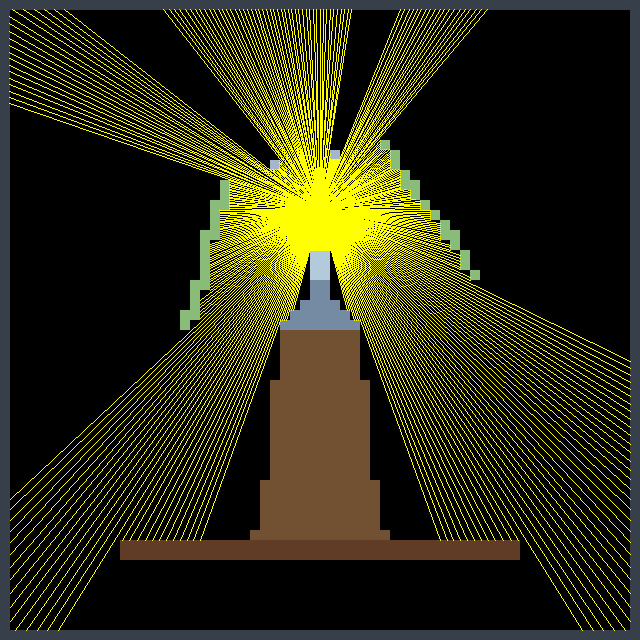
On the Squeak developers mailing list, Lauren Pullen shared her experience (found here) using Squeak while working on a rendering engine for a first-person maze game, similar to the technique used to render the original Wolfenstein 3D game. Wolfenstein 3D used a rendering technique known as ray casting. Her project captured our attention prompting us to seek additional information from her about it.
What is Ray Casting?
Ray casting is an early rendering technique used in computer graphics and video games, particularly in 2.5D and 3D environments. It is a simplified form of ray tracing, where a ray is cast from the player’s or camera’s perspective into the environment, and the distance to the nearest object along that ray is calculated. This process is repeated for each column on the screen, creating a 3D representation of the 2D world. Ray casting was widely used in the early days of 3D gaming, particularly in games like Wolfenstein 3D (1992).
From Lisp to Squeak
Lauren, with her extensive experience in Common Lisp, initially chose it to create a GUI application. However, she faced significant challenges. The graphics library was unreliable, often failing to start, and the outdated documentation made it difficult to work with. She studied MVC while designing her application but struggled with basic functionality, such as displaying a simple window.
She decided to switch to Smalltalk, specifically Squeak, which had an immediate impact. The graphical elements worked seamlessly from the start, and although she missed some features from Common Lisp, like restarts and method combinations, Squeak provided a development environment that allowed her to focus on development without drastically changing her mental approach to problems.
Comparing Development Tools
For game development, she initially relied on a much earlier version of Game Maker Pro. When she explored Godot, she found its complexity overwhelming compared to Smalltalk. The disorganization in Godot’s tutorials made her question how to create a basic viable product efficiently. In contrast, though seemingly minimal, Squeak’s classes Form and UserInputEvent provided all that was needed.
Advantages of Squeak
In Squeak, she found it easy to work with graphical elements. Drawing interface components and importing graphics were straightforward, thanks to the source code access for built-in drawing functions. This simplicity was crucial for her development process. While working on the game, she realized that making changes and seeing immediate results was invaluable for debugging. Her experience with Forth taught her the value of functions that do one thing well, and Smalltalk’s debugging tools like Inspect-It and Debug-It further streamlined the process.
Challenges and Solutions
However, she encountered challenges. While most errors in Smalltalk were easy to handle—usually, closing the Debugger was all that was needed—some issues could freeze the image, making recovery a bit more manual than desired. She found herself needing to use the Recover Changes window to restore unsaved changes more often than she would have liked.
In terms of rendering, she faced performance limits with BitBlt when texturing the floor and ceiling. To overcome this, she turned to the AbstractGPU library, leveraging the graphics card for drawing. She continued to use the ray caster to determine what the player could see to speed up the game, but introduced edge pop-in, where objects on the screen edges would suddenly appear while turning the camera, because of differences between the ray caster’s projection and the GPU’s projection. Increasing the field of view used by the ray caster resolved this issue.
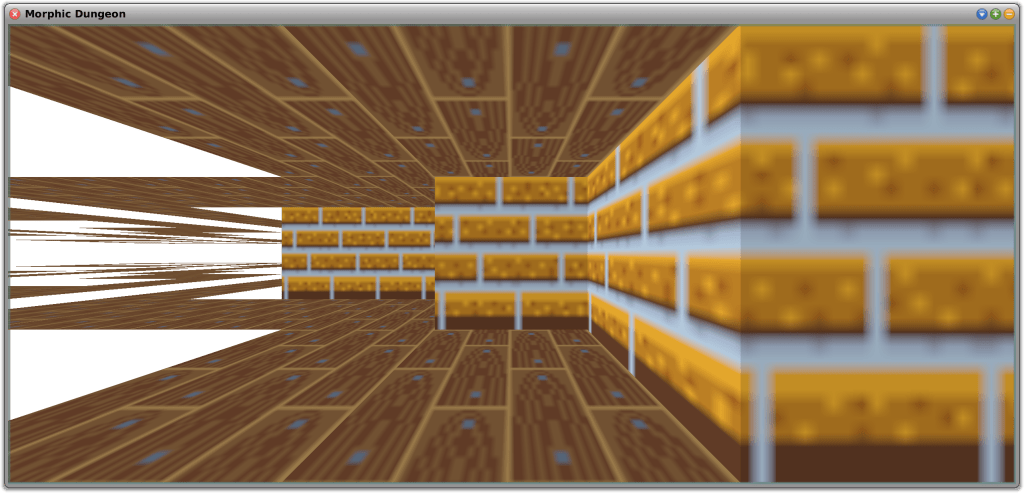
Testing Using Morphic Dungeon
Morphic Dungeon is what Lauren developed and uses to test the movement and texturing code. She wants to work with textures that are not symmetrical, which requires mapping the top-left corner of the texture to different positions on each face of the 3D objects. This approach also allowed her to test back-face culling—a technique that improves performance by not drawing faces of a 3D object that are not visible to the camera—in the GPU mode. In this mode, the “back faces” are flipped horizontally and appear further away, as if looking at the inside of a transparent painted box instead of the outside. Back-face culling will be essential for rendering the “walls” of tiles that the player can enter or see through, such as grass or support beams along the grid edges.
Lauren implemented three movement modes:
Free Movement and Free Turning
Grid-Locked Movement and Free Turning
Grid-Locked Movement and Grid-Locked Turning
Full Free Movement is similar to Wolfenstein 3D, allowing sub-pixel steps and small increment camera rotations.
Grid-Locked Movement is useful for first-person dungeon crawlers. Grid-Locked Turning forces camera rotation to 90-degree increments, similar to classic non-raycaster games like Wizardry or modern titles like Etrian Odyssey. Free camera rotation, with Grid-Locked Movement, is also supported which is similar to the modern title Operencia.
While using Morphic Dungeon to test the different movement modes, Lauren encountered an amusing floating point error whereby the player would step repeatedly through walls and out of the play area. This provided a humorous insight into the potential bugs she might encounter.
Additionally, Lauren tested the game with a family member, revealing that the 40×40 maze, though not difficult from an overhead view, proved challenging from a first-person perspective without an overhead view or compass. This feedback helped her adjust the difficulty of the first area to better suit new players.
Future Plans
Looking ahead, she plans to explore non-flat levels and dynamically stitching multiple maps together. This might result in overlaps while rendering, so the ray caster will be in charge of telling the graphics card what to draw. Meanwhile, she will focus on improving floor and ceiling loading performance, although this is currently less critical due to the few vertices involved.
Lauren believes that developing a game is a great way to introduce people to programming. While tools are useful, having something that you can play with is fun. Old tile-based games and raycasters are particularly appealing to her because they are simple to work with, even for beginners.
Overall, Lauren believes that Squeak has proven to be an excellent choice for her project, offering the simplicity and functionality needed for a successful game development experience.
Why Not Give It a Try?
If you would like to experiment with ray casting in Squeak, you can find out more about her project from SqueakSource here. To use the 3D accelerated package, you will also need AbstractGPU by Ronie Salgado, available (here). Ronie is the author of a number of terrific 3D development tools, including Woden (here) and Sysmel (here). Be sure to explore these excellent resources as well!
Have a great time with Smalltalk and keep on Squeaking!
Squeak is a highly open system, which makes it very easy not only to explore every interesting detail in the image but also to customize everything at your will. Whether you would like to adjust some colors, fix a bug you have stumbled upon, or add a new feature, (almost) everything is flexible and under your control.
Squeak lives from your contributions! Squeak is powered by volunteer open-source contributions. Whenever you make an adjustment to the base system, you might ask yourself: “could others benefit from this change, too?” If the answer is yes, we invite you to consider contributing back to the community. Or if you just discovered a bug, have a question, or would like to discuss an idea, our forums are open!
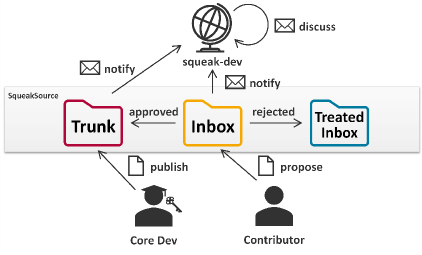
On the mailing list, ideas, bug reports, and patches are exchanged. Version control for all Squeak packages is run via Monticello. All versions that are uploaded to any Squeak package will automatically be forwarded to the list for further discussion. There are three package repositories (hosted on https://source.squeak.org/):
The Trunk repository contains the latest integrated patches. (Only core developers have write access.)
The Inbox repository is the place for all new suggestions and requests for review. Everyone can upload proposals here without the need to create an account. (You can still create an account on https://source.squeak.org/ and edit the repository info of the inbox repository in the Monticello Browser to add your credentials.)
The Treated Inbox repository is for versions that have been dealt with or that have been superseded; it provides some useful history.
The usual workflow for a new contribution is to upload it to the inbox, where others will discuss and review it on squeak-dev, and from where it usually will be merged into the Trunk eventually. Here you can learn more about our development process: https://squeak.org/development_process/.
Making Your First Contribution
Install the latest Trunk updates.
Make your change, preferably starting from a clean image (to avoid configuration drift).
Open the Monticello Browser:
On the left, select the package you have changed (changed packages are marked with an *asterisk).
On the right, select the inbox repository.
On the top, press save.
On the left, select the package you have changed (changed packages are marked with an *asterisk).
On the right, select the inbox repository.
On the top, press save.
Review your changes, enter a meaningful version message that explains what the changes are for (e.g., which bug they address, what they are aimed at improving), and accept the new version to upload it.
That’s it! Your contribution has arrived in the Inbox and soon you will receive feedback from the community through the mailing list. Keep an eye on your mailbox!
Squeak Inbox Talk
Squeak Inbox Talk is an optional tool that attempts to simplify the development process by bringing together all the different artifacts that belong to the development process – mailing list, archives, and Monticello versions – and allowing you to interact with them directly from your image. You can access it from the Tools menu or install it by evaluating Installer installSqueakInboxTalk in a Workspace window.
Change sets: Usually, new proposals are best submitted to the inbox as a new package version. However, when some ideas consist of changes to multiple packages, it becomes tricky to work with multiple versions from the inbox. In this case, a change set is a good alternative. Change sets are collections of methods and class definitions, plus some extras. You can open a dual change sorter from the Tools and Changes menus in the docking bar and open a menu on the change set list on the left. Create a new change set and copy or move all relevant changes to it. Add a preamble to the change set to add an explaining message and finally file out or mail to list it directly. To install a change set, you can file in it from the file list, or you can drag and drop it into Squeak from the outside.
Preambles and postscripts: Some changes make it necessary to run some scripts before or after loading the new code to perform any migrations or changes to the global object graph. This is possible through preambles and postscripts. To add or edit a script for a Monticello package, select it in the Monticello browser and press the Scripts button. Add your logic to the code, test it, save it, and include it in your next inbox version. Note that preambles and postscripts in Trunk packages are required to be idempotent and may be evaluated multiple times. For change sets, you can add a preamble and a postscript as well from the context menu of the change set list in the change sorter.
If you identify any other contribution-related concepts that should be mentioned or explained in greater detail, please feel free to add them to the Contributing to Squeak help documentation. It could even be your first contribution!
Thanks to Christoph Thiede for contributing this excellent documentation! You can find it within the Squeak Help menu (Help->Contributing to Squeak) in the latest alpha version of Squeak. This documentation is especially valuable in this context, as it includes helpful links that execute useful code and actions, further simplifying the process.
Have a great time with Smalltalk and keep Squeaking!