The Universidad Nacional de Mar del Plata will host this year’s Smalltalks 2024 conference from November 13 to 15. A pre-conference Smalltalks track, designed for students and teachers, will take place on November 11 and 12.
Registration is open here, and talk proposals can be submitted until September 30 (extended from the original September 13 deadline). Accepted talks will be announced on October 10.
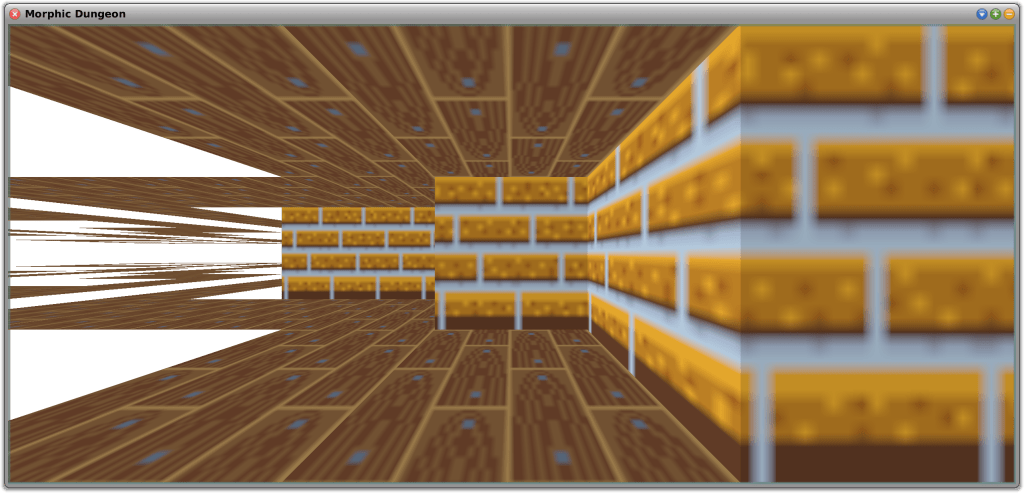
On the Squeak developers mailing list, Lauren Pullen shared her experience (found here) using Squeak while working on a rendering engine for a first-person maze game, similar to the technique used to render the original Wolfenstein 3D game. Wolfenstein 3D used a rendering technique known as ray casting. Her project captured our attention prompting us to seek additional information from her about it.
What is Ray Casting?
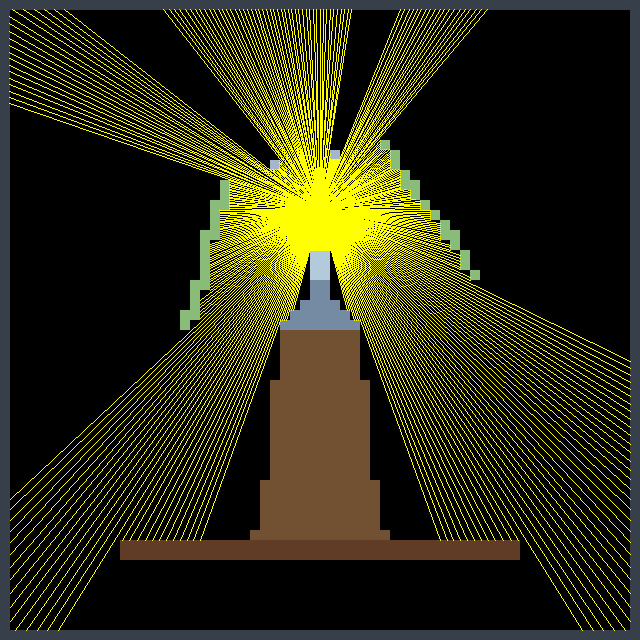
Ray casting is an early rendering technique used in computer graphics and video games, particularly in 2.5D and 3D environments. It is a simplified form of ray tracing, where a ray is cast from the player’s or camera’s perspective into the environment, and the distance to the nearest object along that ray is calculated. This process is repeated for each column on the screen, creating a 3D representation of the 2D world. Ray casting was widely used in the early days of 3D gaming, particularly in games like Wolfenstein 3D (1992).
From Lisp to Squeak
Lauren, with her extensive experience in Common Lisp, initially chose it to create a GUI application. However, she faced significant challenges. The graphics library was unreliable, often failing to start, and the outdated documentation made it difficult to work with. She studied MVC while designing her application but struggled with basic functionality, such as displaying a simple window.
She decided to switch to Smalltalk, specifically Squeak, which had an immediate impact. The graphical elements worked seamlessly from the start, and although she missed some features from Common Lisp, like restarts and method combinations, Squeak provided a development environment that allowed her to focus on development without drastically changing her mental approach to problems.
Comparing Development Tools
For game development, she initially relied on a much earlier version of Game Maker Pro. When she explored Godot, she found its complexity overwhelming compared to Smalltalk. The disorganization in Godot’s tutorials made her question how to create a basic viable product efficiently. In contrast, though seemingly minimal, Squeak’s classes Form and UserInputEvent provided all that was needed.
Advantages of Squeak
In Squeak, she found it easy to work with graphical elements. Drawing interface components and importing graphics were straightforward, thanks to the source code access for built-in drawing functions. This simplicity was crucial for her development process. While working on the game, she realized that making changes and seeing immediate results was invaluable for debugging. Her experience with Forth taught her the value of functions that do one thing well, and Smalltalk’s debugging tools like Inspect-It and Debug-It further streamlined the process.
Challenges and Solutions
However, she encountered challenges. While most errors in Smalltalk were easy to handle—usually, closing the Debugger was all that was needed—some issues could freeze the image, making recovery a bit more manual than desired. She found herself needing to use the Recover Changes window to restore unsaved changes more often than she would have liked.
In terms of rendering, she faced performance limits with BitBlt when texturing the floor and ceiling. To overcome this, she turned to the AbstractGPU library, leveraging the graphics card for drawing. She continued to use the ray caster to determine what the player could see to speed up the game, but introduced edge pop-in, where objects on the screen edges would suddenly appear while turning the camera, because of differences between the ray caster’s projection and the GPU’s projection. Increasing the field of view used by the ray caster resolved this issue.
Testing Using Morphic Dungeon
Morphic Dungeon is what Lauren developed and uses to test the movement and texturing code. She wants to work with textures that are not symmetrical, which requires mapping the top-left corner of the texture to different positions on each face of the 3D objects. This approach also allowed her to test back-face culling—a technique that improves performance by not drawing faces of a 3D object that are not visible to the camera—in the GPU mode. In this mode, the “back faces” are flipped horizontally and appear further away, as if looking at the inside of a transparent painted box instead of the outside. Back-face culling will be essential for rendering the “walls” of tiles that the player can enter or see through, such as grass or support beams along the grid edges.
Lauren implemented three movement modes:
Free Movement and Free Turning
Grid-Locked Movement and Free Turning
Grid-Locked Movement and Grid-Locked Turning
Full Free Movement is similar to Wolfenstein 3D, allowing sub-pixel steps and small increment camera rotations.
Grid-Locked Movement is useful for first-person dungeon crawlers. Grid-Locked Turning forces camera rotation to 90-degree increments, similar to classic non-raycaster games like Wizardry or modern titles like Etrian Odyssey. Free camera rotation, with Grid-Locked Movement, is also supported which is similar to the modern title Operencia.
While using Morphic Dungeon to test the different movement modes, Lauren encountered an amusing floating point error whereby the player would step repeatedly through walls and out of the play area. This provided a humorous insight into the potential bugs she might encounter.
Additionally, Lauren tested the game with a family member, revealing that the 40×40 maze, though not difficult from an overhead view, proved challenging from a first-person perspective without an overhead view or compass. This feedback helped her adjust the difficulty of the first area to better suit new players.
Future Plans
Looking ahead, she plans to explore non-flat levels and dynamically stitching multiple maps together. This might result in overlaps while rendering, so the ray caster will be in charge of telling the graphics card what to draw. Meanwhile, she will focus on improving floor and ceiling loading performance, although this is currently less critical due to the few vertices involved.
Lauren believes that developing a game is a great way to introduce people to programming. While tools are useful, having something that you can play with is fun. Old tile-based games and raycasters are particularly appealing to her because they are simple to work with, even for beginners.
Overall, Lauren believes that Squeak has proven to be an excellent choice for her project, offering the simplicity and functionality needed for a successful game development experience.
Why Not Give It a Try?
If you would like to experiment with ray casting in Squeak, you can find out more about her project from SqueakSource here. To use the 3D accelerated package, you will also need AbstractGPU by Ronie Salgado, available (here). Ronie is the author of a number of terrific 3D development tools, including Woden (here) and Sysmel (here). Be sure to explore these excellent resources as well!
Have a great time with Smalltalk and keep on Squeaking!
Squeak is a highly open system, which makes it very easy not only to explore every interesting detail in the image but also to customize everything at your will. Whether you would like to adjust some colors, fix a bug you have stumbled upon, or add a new feature, (almost) everything is flexible and under your control.
Squeak lives from your contributions! Squeak is powered by volunteer open-source contributions. Whenever you make an adjustment to the base system, you might ask yourself: “could others benefit from this change, too?” If the answer is yes, we invite you to consider contributing back to the community. Or if you just discovered a bug, have a question, or would like to discuss an idea, our forums are open!
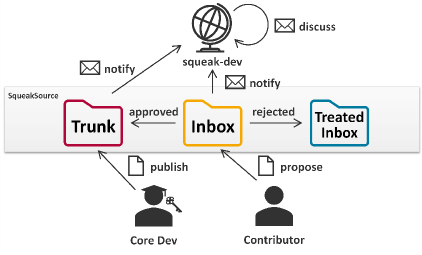
On the mailing list, ideas, bug reports, and patches are exchanged. Version control for all Squeak packages is run via Monticello. All versions that are uploaded to any Squeak package will automatically be forwarded to the list for further discussion. There are three package repositories (hosted on https://source.squeak.org/):
The Trunk repository contains the latest integrated patches. (Only core developers have write access.)
The Inbox repository is the place for all new suggestions and requests for review. Everyone can upload proposals here without the need to create an account. (You can still create an account on https://source.squeak.org/ and edit the repository info of the inbox repository in the Monticello Browser to add your credentials.)
The Treated Inbox repository is for versions that have been dealt with or that have been superseded; it provides some useful history.
The usual workflow for a new contribution is to upload it to the inbox, where others will discuss and review it on squeak-dev, and from where it usually will be merged into the Trunk eventually. Here you can learn more about our development process: https://squeak.org/development_process/.
Making Your First Contribution
Install the latest Trunk updates.
Make your change, preferably starting from a clean image (to avoid configuration drift).
Open the Monticello Browser:
On the left, select the package you have changed (changed packages are marked with an *asterisk).
On the right, select the inbox repository.
On the top, press save.
On the left, select the package you have changed (changed packages are marked with an *asterisk).
On the right, select the inbox repository.
On the top, press save.
Review your changes, enter a meaningful version message that explains what the changes are for (e.g., which bug they address, what they are aimed at improving), and accept the new version to upload it.
That’s it! Your contribution has arrived in the Inbox and soon you will receive feedback from the community through the mailing list. Keep an eye on your mailbox!
Squeak Inbox Talk
Squeak Inbox Talk is an optional tool that attempts to simplify the development process by bringing together all the different artifacts that belong to the development process – mailing list, archives, and Monticello versions – and allowing you to interact with them directly from your image. You can access it from the Tools menu or install it by evaluating Installer installSqueakInboxTalk in a Workspace window.
Change sets: Usually, new proposals are best submitted to the inbox as a new package version. However, when some ideas consist of changes to multiple packages, it becomes tricky to work with multiple versions from the inbox. In this case, a change set is a good alternative. Change sets are collections of methods and class definitions, plus some extras. You can open a dual change sorter from the Tools and Changes menus in the docking bar and open a menu on the change set list on the left. Create a new change set and copy or move all relevant changes to it. Add a preamble to the change set to add an explaining message and finally file out or mail to list it directly. To install a change set, you can file in it from the file list, or you can drag and drop it into Squeak from the outside.
Preambles and postscripts: Some changes make it necessary to run some scripts before or after loading the new code to perform any migrations or changes to the global object graph. This is possible through preambles and postscripts. To add or edit a script for a Monticello package, select it in the Monticello browser and press the Scripts button. Add your logic to the code, test it, save it, and include it in your next inbox version. Note that preambles and postscripts in Trunk packages are required to be idempotent and may be evaluated multiple times. For change sets, you can add a preamble and a postscript as well from the context menu of the change set list in the change sorter.
If you identify any other contribution-related concepts that should be mentioned or explained in greater detail, please feel free to add them to the Contributing to Squeak help documentation. It could even be your first contribution!
Thanks to Christoph Thiede for contributing this excellent documentation! You can find it within the Squeak Help menu (Help->Contributing to Squeak) in the latest alpha version of Squeak. This documentation is especially valuable in this context, as it includes helpful links that execute useful code and actions, further simplifying the process.
Have a great time with Smalltalk and keep Squeaking!
Tim Rowledge, a dedicated community member and long-time contributor, has uncovered a fantastic resource for tech enthusiasts: a comprehensive archive of BYTE magazine issues hosted on World Radio History. This well-organized collection spans from 1975 to 1994 and offers a detailed look at the technological advancements of the time, including the early development of Smalltalk. You can explore the archive here.
Among the highlights is the August 1981 edition, famous for featuring the iconic Smalltalk balloon on its cover. This issue is notable for introducing Smalltalk’s unofficial logo. Curious about the significance of the hot air balloon and what it represents? Delve into this intriguing piece of history on the Squeak wiki. You can access the 1981 edition here.
Also of interest is the August 1991 issue, which includes the article “Smalltalk: 10 Years of Objects.” This piece provides a retrospective and a forward-looking view on Smalltalk, reflecting on its progress since the 1981 feature. You can view this edition here.
World Radio History’s BYTE magazine archive is a valuable tool for anyone interested in the history of computing and programming languages, offering both a broad overview and specific insights into the technology of the past.
Additionally, Tim also found some other nice historical videos presented by Capt. Grace Hooper at NSA in 1982 on “Future Possibilities: Data, Hardware, Software, and People.” You may find some fascinating bits of history from her lectures. You can view part 1 here and part 2 here.
The BYTE archive, along with these historical videos, offers a unique perspective on how early technologies and visionary ideas have shaped modern computing. Together, they provide an invaluable window into the technological advancements and influential figures that have defined the computing landscape.
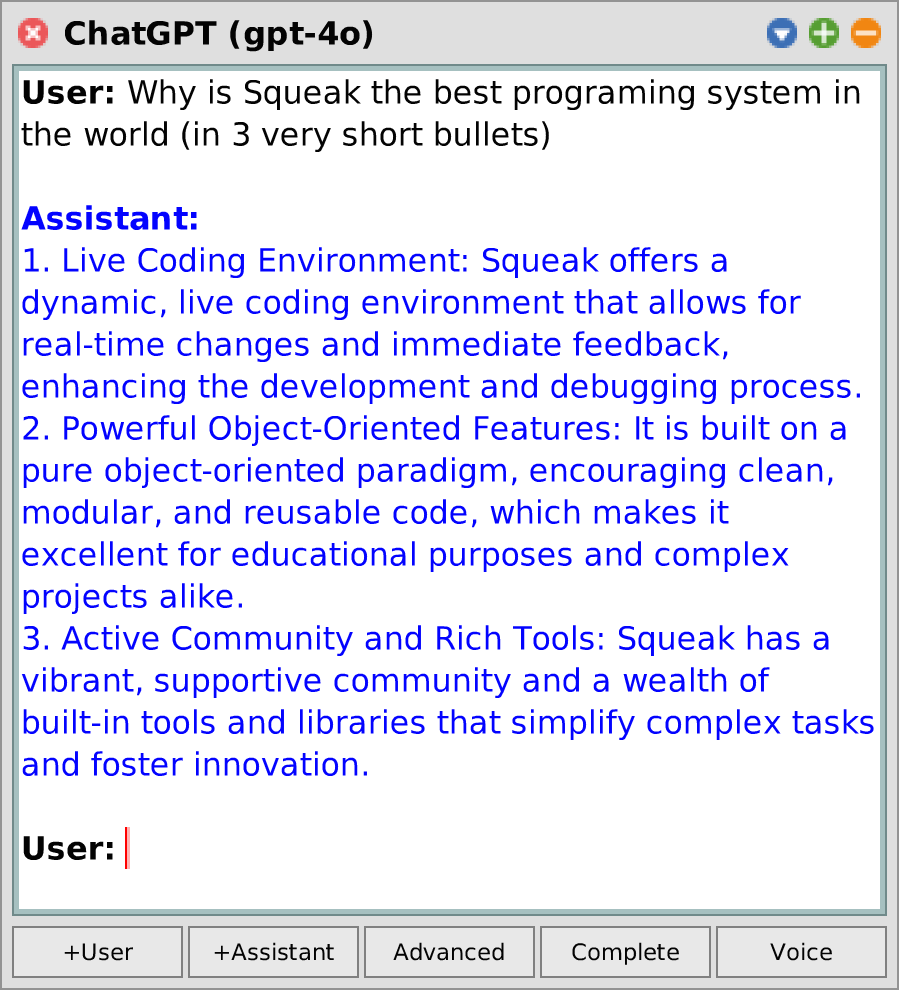
ChatGPT, embedding search, and retrieval-augmented generation for Squeak/Smalltalk. The package aims to make semantic context accessible in Squeak/Smalltalk by providing the following features:
OpenAI API client: Currently supports chat completions and embeddings. Includes tools for managing rate limits, tracking expenses, and estimating prices for queries.
SemanticConversation: Framework for conversational agents like ChatGPT.
ChatGPT: Conversational GUI for Squeak. Supports streaming responses, editing conversations, and defining system messages.
SemanticCorpus: Framework for semantic search, similarity search, and retrieval-augmented generation (RAG, aka “chat with your data”) through the power of text embeddings. Implements a simple yet functional vector database.
Experimental tools such as an integration of semantic search and RAG into Squeak’s Help Browser or Squeak’s mailing list.
March 2024 Release 1.2.0 adds FFI and MIDI plugins, JIT for Sista bytecodes, JPEG write prim, fixes keyboard input, copy/paste, scroll wheel, highdpi, allows ES6 in source.
SqueakJS executes Squeak in a web page. It is a fully capable virtual machine implemented in pure JavaScript running unmodified Smalltalk images. Check it out at https://squeak.js.org/.
Early Registration Fee: 600€ (all days) / 200€ (per day)
Late Registration Fee: 1000€ (all days) / 300€ (per day)
Extra person to social dinner: 70€
Payment by bank transfer: free of charge
Payment by credit card: +6% fees
For late registrations we cannot ensure the availability of T-Shirts nor Social Event extra participants
: If the refund is requested during the early bird period all the fee (without charges) will be refunded. If it is requested after the early bird period is finished, the refund will be 50%














 The Weekly Squeak