
Squeak is a highly open system, which makes it very easy not only to explore every interesting detail in the image but also to customize everything at your will. Whether you would like to adjust some colors, fix a bug you have stumbled upon, or add a new feature, (almost) everything is flexible and under your control.
Squeak lives from your contributions! Squeak is powered by volunteer open-source contributions. Whenever you make an adjustment to the base system, you might ask yourself: “could others benefit from this change, too?” If the answer is yes, we invite you to consider contributing back to the community. Or if you just discovered a bug, have a question, or would like to discuss an idea, our forums are open!
The Squeak Community Model
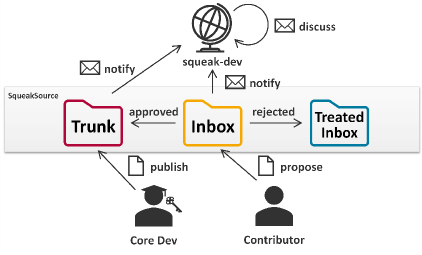
The majority of communication about the Squeak development takes place on the squeak-dev mailing list. There is a public mailing list archive, but to engage in any discussion, you have to sign up for the list. Alternatively, you can report issues on our GitHub issue tracker.
On the mailing list, ideas, bug reports, and patches are exchanged. Version control for all Squeak packages is run via Monticello. All versions that are uploaded to any Squeak package will automatically be forwarded to the list for further discussion. There are three package repositories (hosted on https://source.squeak.org/):
- The Trunk repository contains the latest integrated patches. (Only core developers have write access.)
- The Inbox repository is the place for all new suggestions and requests for review. Everyone can upload proposals here without the need to create an account. (You can still create an account on https://source.squeak.org/ and edit the repository info of the inbox repository in the Monticello Browser to add your credentials.)
- The Treated Inbox repository is for versions that have been dealt with or that have been superseded; it provides some useful history.
The usual workflow for a new contribution is to upload it to the inbox, where others will discuss and review it on squeak-dev, and from where it usually will be merged into the Trunk eventually. Here you can learn more about our development process: https://squeak.org/development_process/.
Making Your First Contribution
- Install the latest Trunk updates.
- Make your change, preferably starting from a clean image (to avoid configuration drift).
- Open the Monticello Browser:
- On the left, select the package you have changed (changed packages are marked with an *asterisk).
- On the right, select the inbox repository.
- On the top, press save.
- On the left, select the package you have changed (changed packages are marked with an *asterisk).
- On the right, select the inbox repository.
- On the top, press save.
- Review your changes, enter a meaningful version message that explains what the changes are for (e.g., which bug they address, what they are aimed at improving), and accept the new version to upload it.
- That’s it! Your contribution has arrived in the Inbox and soon you will receive feedback from the community through the mailing list. Keep an eye on your mailbox!
Squeak Inbox Talk
Squeak Inbox Talk is an optional tool that attempts to simplify the development process by bringing together all the different artifacts that belong to the development process – mailing list, archives, and Monticello versions – and allowing you to interact with them directly from your image. You can access it from the Tools menu or install it by evaluating Installer installSqueakInboxTalk in a Workspace window.

More information on Squeak Inbox Talk can be found on GitHub: https://github.com/hpi-swa-lab/squeak-inbox-talk.
Advanced Concepts
Change sets: Usually, new proposals are best submitted to the inbox as a new package version. However, when some ideas consist of changes to multiple packages, it becomes tricky to work with multiple versions from the inbox. In this case, a change set is a good alternative. Change sets are collections of methods and class definitions, plus some extras. You can open a dual change sorter from the Tools and Changes menus in the docking bar and open a menu on the change set list on the left. Create a new change set and copy or move all relevant changes to it. Add a preamble to the change set to add an explaining message and finally file out or mail to list it directly. To install a change set, you can file in it from the file list, or you can drag and drop it into Squeak from the outside.
Preambles and postscripts: Some changes make it necessary to run some scripts before or after loading the new code to perform any migrations or changes to the global object graph. This is possible through preambles and postscripts. To add or edit a script for a Monticello package, select it in the Monticello browser and press the Scripts button. Add your logic to the code, test it, save it, and include it in your next inbox version. Note that preambles and postscripts in Trunk packages are required to be idempotent and may be evaluated multiple times. For change sets, you can add a preamble and a postscript as well from the context menu of the change set list in the change sorter.
If you identify any other contribution-related concepts that should be mentioned or explained in greater detail, please feel free to add them to the Contributing to Squeak help documentation. It could even be your first contribution!
Thanks to Christoph Thiede for contributing this excellent documentation! You can find it within the Squeak Help menu (Help->Contributing to Squeak) in the latest alpha version of Squeak. This documentation is especially valuable in this context, as it includes helpful links that execute useful code and actions, further simplifying the process.
Have a great time with Smalltalk and keep Squeaking!





 The Weekly Squeak