Category: Squeak

  • Nepal’s Open Learning Exchange Announces First Learning Activity (It’s Squeak!)

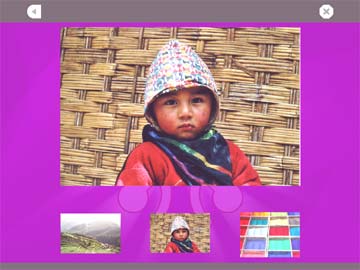
    Nepal's Open Learning Exchange Announces First Learning Activity (It's Squeak!) - picture 1

    The world watches as the adults fight over power. Who will run the country of Napal, what will the political solutions bring to the people, what will it mean to the children? I know I’m not the first to recognize the incredible beauty of the country, just look at these beautiful pictures in Nepal’s Open Learning Exchange first learning activity, developed in Squeak to be used in OLPC. We can only hope that the people that win power, during this difficult time, will concentrate on the children, on education, and on happiness and enlightenment for all.
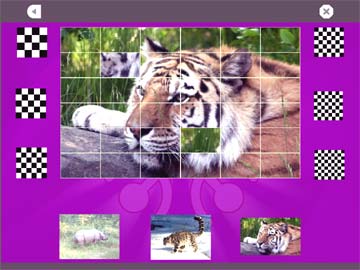
    Nepal's Open Learning Exchange Announces First Learning Activity (It's Squeak!) - picture 2

    The Program itself is beautifully done. I found myself learning how to say the numbers. This Tiger was really fun, and kinda difficult to reconstruct.

    This is a very good example of what technology can give to children, and how the local community can participate to help educate their youngest members.

    Read it from the creators:

    “The word in Devanagari script at the top is “E-Paati.” OLE Nepal’s General Secretary created this term. “Karipaati” means blackboard and we use “E-Paati” to refer to any kind of computer, such as a desktop, laptop, or PDA. OLE Nepal’s unofficial slogan right now is “From Karipaati to E-Paati.” We think this slogan expresses that using laptops in schools in simply the next logical step in education. We prefer the E-Paati over “laptop” or “computer” because both are seen as luxuries in Nepal. Karipaatis are not seen as luxuries but essential to education. We hope to convince the Nepali public that in this day in age E-paatis are essential to a quality education. “

    This level of understanding of local conditions can only come from the local people themselves. Developing an education platform and making the tools available throughout the world far surpasses the value of a cheap laptop. This is only one of what will be thousands of projects that will change the planet. The $100 Laptop came first but everything else comes now. The software will easily surpass the value of the computer! As Nicholas Negroponte is fond of saying, “This is an education project, not a laptop project.” We couldn’t agree more, and we are proud that Squeak and EToys are a part of this terrific project. Today is a good day to celebrate E-Paati!

  • Seaside 2.8 Released!!

    Seaside 2.8 nb

    After a beta phase of two months we release the final version of Seaside 2.8. Most bugs fixed during this period were either long standing (already in 2.7), minor or portability related, Together with the dozens of Seaside 2.8 applications already in production today this gives a pretty good feeling about this version. A special mention goes to Roger Whitney, thanks to him we went from 99 commented classes to 144.

    This release brings major performance and memory improvements:

    • The rendering speed of an average page is up to twice as fast as with previous versions, because of the new character encoding architecture.
    • An average application requires up to four times less memory than with previous versions. The reason for this is the optimized object backtracking and the reduction of stored continuations.

    We have a list of new features [1] and a migration guide [2] on our homepage.

    Squeak users can get it either from SqueakMap, Universes or directly via Monticello (Seaside2.8a1-lr.518). A special note for Squeak users, do not load Seaside 2.8 into an image that has already Seaside 2.7 in it. If you use Squeak 3.7 you will have to load SeasideSqueak37 as well.

    VisualWorks users can get it form Store (2.8a1-lr.518,tkogan).

    GemStone/S users can load Seaside2.8g1-dkh.522.

    [1] http://www.seaside.st/community/development/seaside28
    [2] http://www.seaside.st/documentation/migration

    Cheers
    The Seaside Team

  • Recess!! Learning at play.

    Etoys

    Bill Kerr tells us about a really cool new project from Mark Shuttleworth’s Foundation called Kusasa.

    Check out Bills comments about learning from Play, and please be sure to follow the links on his post, they are very interesting.

  • Squeak BOF at OOPSLA – highlights + videos

    OOPSLA 2007

    Alexandre Bergel and Göran Krampe reported on the mailing-list (1, 2) the highlights of the Squeak BOF session at OOPSLA 2007 on Monday:

    • Jamie Douglass discussed CAT, an alternative to SmaCC
    • Andrew P. Black showed “Squeak by Example” (and sold a few more copies!)
    • Alessandro Warth showed how to implement a JavaScript interpreter in 300 lines of code by using OMeta (SqueakMap page, paper[pdf] co-authored with Ian Piumarta)
    • Göran gave a presentation on DeltaStreams
    • Maurice Rabb talked about condensing the change and sources files of Squeak
    • Alexandre Bergel introduced Athena Smalltalk – a Smalltalk Virtual Machine in Java, and intended to be embedded in Java applications (project homepage)
    • Bert Freudenberg and Yoshiki Ohshima demonstrated eToys on the OLPC XO laptop

    Göran filmed the event, and has made the videos available at his blog.

    Alexander Lazarevič is making compressed versions available through an online player:

  • Capturing Debug

    Debug

    Giles Bowkett sparked a bit of controversy. There have been some interesting responses from James and Avi. I figured I would just stay out of it, and I did a pretty good job resisting. Until now.

    Giles is right. Tools do not make good programmers. Coding in a debugger has the tendency to create lava code. Some of the worst code I’ve ever seen was the result of one more patch on a mountain of crap. The code just grows and grows until what ever was originally intended is completely lost and nothing is understandable.

    That said, if you try to take away my Smalltalk debugger I will break your arm. Why? Because tools do not make good programmers. Even the Smalltalk debugger which is way more then your ordinary debugger will not help you. It will not cause you to write better code but it won’t hurt either. Anyone that has used and understands the Smalltalk debugger knows that it is a very powerful tool to realize your design.

    If your design sucks then Giles is right a debugger is not going to help and will probably make things worse. If on the other hand you are a good programmer a debugger as capable as the Smalltalk debugger is extremely liberating.

    I can understand why some people do not appreciate the power of the Smalltalk debugger. Most people think of debuggers as a way to watch a value or set a break point. They do not understand that Smalltalk is different and miss the point. As a live system that doesn’t need to be recompiled, a system that is running while you program, the Smalltalk debugger gives the developer unprecedented access to the heart of the language.

    We have access to everything that is Smalltalk in that debugger. We can change running programs and step right into the code we just typed. We can view the whole running stack and full context. We can change data in objects, create new objects, do anything that can be done in Smalltalk right from the debugger!

    Ever wanted to step through a loop? You need to see how the system handles the 57th item. You could add code to break at that point. You could write tests that isolate that data and run it separately. You could use aspects to keep from having to change the code but you are really working hard to do something pretty simple. The worst possible solution is hitting step until you get there! Since everything is live and dynamic in Smalltalk I just change the index to 56 and step from there! See it’s pretty simple in Smalltalk!

    Yes tests are good and there is no substitution for good design. That doesn’t change with a powerful debugger. Powerful tools can enable bad programmers to program badly, but that doesn’t counter the argument that good programmers benefit from complete access to a dynamic running system.

    Ok so break your arm is a bit strong, but I hope you understand that the debugger is our window into the heart of Smalltalk, maybe we should name it something else because it does way more then capturing debug.

    – Ron Teitelbaum * President / Principal Software Engineer * US Medical Record Specialists

  • New Seaside Tutorial By Hasso-Plattner-Institute

    Hasso-Plattner-Institute Seaside Tutorial

    Michael Perscheid announced that the Hasso-Plattner-Institute has just finished a new Seaside Tutorial. Thanks for your hard work! Great Job!

    From Michael:

    Dear list,

    We proudly present a new Seaside tutorial (for Squeak 3.10 and Seaside 2.8).
    This tutorial was produced by the Software Architecture Group at the Hasso-Plattner-Institute (University of Potsdam). In ten chapters we describe step by step the development of a ToDo-application and thereby demonstrate the main parts of the sophisticated web framework Seaside.

    Since this is the first version we hope that you can help to improve the quality by providing feedback.

    Have a look at: http://www.swa.hpi.uni-potsdam.de/seaside/tutorial

    Regards
    Michael Perscheid

  • See Bert and OLPC on German TV (in German)

    Bert and Olpc on German TV

    Check out Bert and Olpc on the tagesschau.de. The video is in German. Notice the link on the left “100-Dollar-Laptop” that will take you right to the clip. Feel free to skip the computer salesman’s comments. Who knows where they got this guy from! The project must be looking up if this is the best they can do. It’s like the debate about global warming in the U.S.A. For a long time we’d hear that scientists have reached a global consensus, all except Joe – from the Wyoming Science Club who says global warming doesn’t exist.

    This is a very exciting time for olpc. Congratulations everyone.

  • Dan’s the Man! Check out Dan Ingalls work. Squeak in JavaScript.

    Squeak in JavaScript

    Dan Ingalls working at Sun Labs has just released their first version of Morphic implemented completely with JavaScript which they are calling the Lively Kernel. There is no plugin required, but your browser currently must support SVG. You should use your Safari browser for best results. It will work with Firefox but you should expect bugs. It does not work with Internet Explorer yet.

    Point your supported browser here to see this exciting work! Great Job to the team at Sun, Dan Ingalls, Tommi Mikkonen, Krzysztof Palacz, and Antero Taivalsaari.

  • Pretty Cool NYTimes OLPC Review

    OLPC Interface

    David Pogue at NYTimes reviews the One Laptop Per Child computer.  Don’t miss the video clip, it’s very cool.

  • Tangible User Interface for Squeak

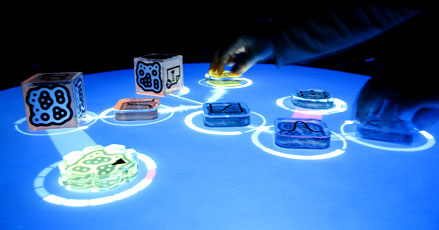
    Reactable in action

    Simon Holland yesterday announced on the squeak-dev list the release of a Squeak client for TUIO under the MIT licence. TUIO allows the rapid development of table-based tangible user interfaces (TUI) and multi-touch interactive surfaces.

    TUIO uses the reacTIVision computer vision system to track physical objects in real time. This system is also used in reactable – the electronic music interface used by Björk in her current world tour.

    The Squeak package includes the Tuio client and demonstration application program. To make practical use of Tuio for Squeak you will need a webcam or other camera, and should download the free Reactivision application for your operating system.

    (Image shows reactable in action from http://mtg.upf.edu/reactable )